Social Engineering Security Definition: A SOC Architecture Guide for 2026

Social engineering security definition sounds like a glossary problem. In production, it is not. The SOC does not lose time because nobody can define phishing, pretexting, vishing, or business email compromise. The SOC loses time because those events enter the security stack as disconnected fragments.
One alert lands in email security. Another lands in identity. A user forwards a suspicious message to a mailbox nobody owns. An executive gets a voice call. A help desk ticket asks for MFA reset. Each item looks small until someone connects the chain.
Teams think the problem is user awareness. The real problem is workflow ownership across identity, messaging, endpoint, SaaS, telecom, and incident response.
That changes the conversation. A useful social engineering security definition for 2026 is not a sentence for a policy document. It is an operating model: which signals matter, where they route, how they are correlated, who owns each decision, and how the organization proves controls are working.
Table of contents
- Social engineering security definition for SOC teams
- Why social engineering is an architecture problem
- The social engineering attack chain
- Signals your SOC should collect
- Detection engineering for social engineering security definition
- Triage workflow: from suspicious contact to incident
- Response playbooks that reduce damage
- Common failure modes
- What works and what fails
- Measuring social engineering defense
- Product fit: where ThreatCrush belongs
- Closing: make social engineering measurable
Social engineering security definition for SOC teams

The phrase social engineering security definition is usually handled too narrowly. It gets reduced to “manipulating people into revealing information or performing unsafe actions.” That is accurate, but not sufficient for a SOC.
A SOC needs a definition that can drive detection, routing, response, and control validation.
The operator definition
For security operations, social engineering is an attack pattern where an adversary manipulates human trust, business process, or support workflow to gain access, move money, steal data, bypass controls, or prepare a later technical compromise.
This definition matters because it includes both the human interaction and the operational outcome. A fake invoice, MFA fatigue push, recruiter lure, OAuth consent trick, and help desk reset scam are not separate worlds. They are different paths to the same goals: access, authority, and action.
Practical rule: Define social engineering by the decision the attacker wants the victim or process to make, not only by the channel used to deliver the lure.
Why the classic definition is too small
The mistake teams make is treating social engineering as a user behavior issue. That creates a weak control model: train users, run phishing simulations, blame clicks, repeat quarterly.
Training helps, but it does not create a detection pipeline. It does not correlate a password reset request with a suspicious login, a new inbox rule, and a finance Slack message. It does not tell the SOC whether a suspicious email is already part of a campaign hitting five subsidiaries.
A better definition forces teams to ask operational questions:
- What systems expose trust decisions?
- Which logs show manipulation attempts?
- Which teams own intervention?
- Which workflows can an attacker abuse?
- Which response action stops damage fastest?
That changes the conversation from “did the employee fail?” to “did the control system detect and contain the manipulation?”
The assets under attack
Social engineering does not primarily attack passwords. It attacks trust boundaries.
Common targets include:
- Identity proofing and MFA reset workflows
- Payment approval chains
- Executive communication channels
- Vendor onboarding and invoice changes
- OAuth consent and SaaS integrations
- Help desk identity verification
- Recruiting and document review workflows
- Source code access and cloud administrator roles
The practical question is not whether humans are vulnerable. Humans are always part of the system. The question is whether the SOC can observe and interrupt the attacker’s path before access or money leaves the organization.
Why social engineering is an architecture problem
Most organizations have tools that touch social engineering: email gateways, EDR, SIEM, IAM, ticketing, SOAR, awareness platforms, browser isolation, SaaS audit logs, and collaboration security. What breaks in practice is the gap between those tools.
The attacker uses business process gaps
A social engineering campaign often succeeds because it crosses ownership boundaries. Email security owns the message. IAM owns login. Finance owns payment. IT owns reset. Legal owns supplier review. The SOC may own investigation, but not the business decision being abused.
An attacker knows this. They create urgency, impersonate authority, and choose the channel where verification is weakest.
Examples:
- A fake vendor email asks finance to update bank details.
- A caller claims to be an employee locked out before a board meeting.
- A compromised executive account requests sensitive files in a collaboration tool.
- A fake recruiter message sends a candidate review document with malware.
None of these are only “phishing.” They are process attacks.
The SOC sees symptoms, not the campaign
The SOC often receives symptoms:
- User-reported suspicious email
- Impossible travel alert
- MFA push anomaly
- New forwarding rule
- EDR detection on a downloaded file
- Unusual OAuth grant
- Finance fraud ticket
Individually, each symptom may look low or medium severity. Together, they can indicate active compromise. This is why social engineering defense depends on correlation and context, not just prevention.
If your team is redesigning SOC operating models, the broader workflow framing in Security Operations: A Complete Guide for 2026 is useful because social engineering defense has to plug into the same queue, escalation, and measurement system as other detections.
Control ownership is usually split
No single tool owns social engineering risk. That is why definitions matter. A definition should tell every owner what they are responsible for.
- Email security owns message inspection and removal.
- IAM owns identity events, session revocation, MFA policies, and access recovery.
- Endpoint owns payload execution and browser activity.
- Finance owns payment verification controls.
- Help desk owns reset verification.
- SOC owns triage, correlation, severity, and incident coordination.
Related reading from our network: teams working on cloud identity controls face similar ownership tradeoffs in Identity and Access Management for Cloud Security.
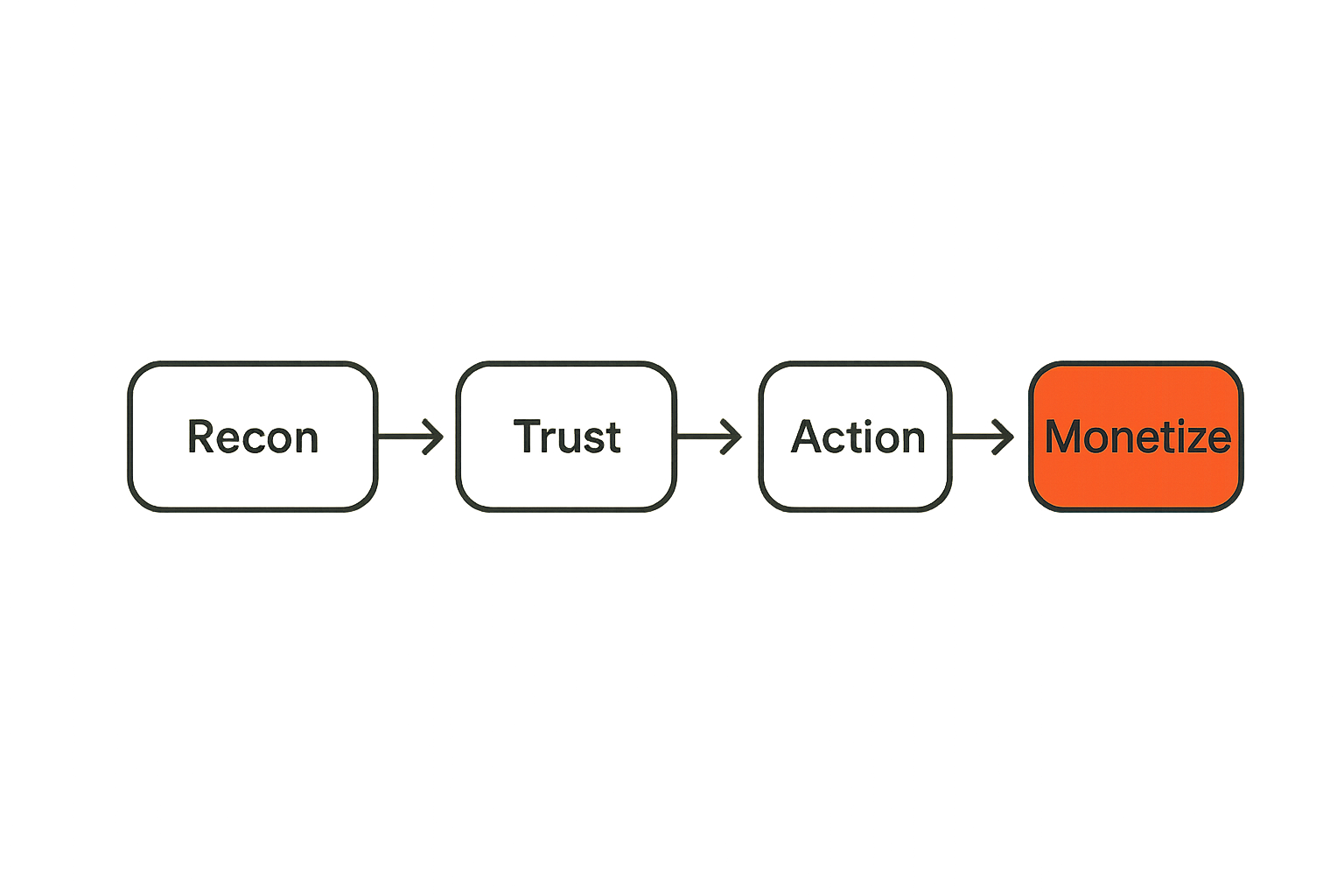
The social engineering attack chain
Social engineering is easier to defend when it is modeled as a chain. The channel may change, but the sequence is often stable.
Reconnaissance and targeting
Attackers collect context before contact. They scrape LinkedIn, breached credentials, public GitHub, supplier pages, calendar leaks, press releases, domain registration, conference talks, and employee social posts.
Detection opportunities at this phase are limited but not zero. Threat intelligence can identify:
- Lookalike domains
- Newly registered domains imitating the brand
- Credential dumps containing corporate accounts
- Exposed employee data used for targeting
- Mentions of executives or business units on criminal forums
This is where proactive monitoring helps. The SOC should not wait for the first employee report if attacker infrastructure is already visible.
Trust establishment
The attacker then builds credibility. This may be a spoofed email, a compromised vendor account, a fake login page, a voice call, a chat message, or a meeting invite.
Trust establishment usually uses one of four levers:
- Authority: “The CEO needs this now.”
- Urgency: “Your account will be disabled today.”
- Familiarity: “Following up on our previous thread.”
- Process ambiguity: “This is the new vendor onboarding step.”
Detection at this phase depends on message metadata, sender reputation, domain similarity, authentication results, URL analysis, attachment behavior, and user reports. But it also depends on business context. A suspicious invoice to finance is more important than the same attachment sent to a test mailbox.
Action and monetization
The attacker wants action:
- Enter credentials
- Approve MFA
- Install remote access software
- Open a payload
- Change bank details
- Share a document
- Grant OAuth access
- Reset an account
- Move funds
The SOC should map each action to containment. Credential theft requires password reset and session revocation. OAuth abuse requires app revocation. Payment fraud requires finance hold and bank contact. Malware requires endpoint containment. A fake vendor request requires business process rollback.
Practical rule: A social engineering playbook is incomplete until every attacker-requested action maps to a containment action.
Signals your SOC should collect
The useful signal set is broader than email. If your definition stops at phishing, you will miss the attacks that move through identity and collaboration tools.
Messaging and collaboration telemetry
Collect and normalize:
- Email sender, envelope, display name, SPF, DKIM, DMARC result
- URL rewrite and click telemetry
- Attachment hash, file type, sandbox verdict
- User report metadata
- Mailbox rule creation
- Message trace and delivery status
- Slack, Teams, or collaboration audit events
- External user invitations and guest access changes
Pay attention to reply-chain attacks. A legitimate compromised mailbox may pass authentication checks, but the content and requested action are hostile.
Identity and access telemetry
Identity telemetry is often where social engineering becomes visible.
Important events include:
- Failed and successful login bursts
- MFA prompt anomalies
- MFA method changes
- Password resets
- Help desk recovery events
- New device registration
- Risky sign-ins
- Conditional access failures
- Privilege escalation
- Token refresh anomalies
- OAuth consent grants
The mistake teams make is sending identity events to a separate queue without linking them to the reported lure. If the email alert and identity alert do not meet, investigation time expands.
Endpoint, browser, and SaaS telemetry
Social engineering frequently lands in the browser or SaaS layer, not in traditional malware execution.
Useful telemetry includes:
- Browser downloads and navigation events
- Clipboard and credential entry patterns where available
- Remote access tool installation
- EDR process trees for document payloads
- SaaS file sharing changes
- Data export events
- Admin console activity
- DLP alerts tied to recent suspicious contact
Related reading from our network: remote collaboration stacks create similar visibility and access questions, which are covered from an operator angle in Cloud Based Productivity and Collaboration Tools.
Detection engineering for social engineering security definition
Detection engineering is where the social engineering security definition becomes executable. The goal is not to write one magic phishing rule. The goal is to express the attacker’s path as correlated behaviors.
Behavior beats keywords
Keyword rules catch obvious lures and generate noise. Attackers change wording quickly. Better detections focus on behavior and context:
- New sender plus payment language plus executive impersonation
- Newly registered lookalike domain plus credential page
- User report plus successful login from new geography
- MFA reset plus help desk ticket plus privileged group membership
- OAuth grant to unverified app plus mailbox read permission
- External chat invite plus file download plus endpoint execution
Keywords can enrich severity, but they should not be the only trigger.
Correlation rules that hold up
Good social engineering detections correlate across time, entity, and requested action.
Useful correlation pivots:
- User identity
- Sender domain
- URL domain
- Attachment hash
- IP address
- Device ID
- SaaS app ID
- Ticket ID
- Vendor name
- Business unit
Time windows matter. A user may click a link at 9:03, enter credentials at 9:04, trigger MFA at 9:05, and get a suspicious login alert at 9:07. If your SIEM rules evaluate those independently, the incident looks smaller than it is.
Example detection logic
A simple correlation pattern can be more valuable than a complex model:
rule: reported_email_followed_by_identity_risk
window: 30m
entities:
  - user.email
conditions:
  - email.user_reported_suspicious == true
  - identity.signin_from_new_country == true OR identity.mfa_push_denied >= 2
  - url.domain_age_days < 30 OR email.sender_domain_similarity >= high
severity: high
actions:
  - create_incident
  - enrich_with_message_trace
  - pull_identity_timeline
  - recommend_session_revocation
This is not glamorous. It is useful. It connects the social contact to the identity outcome.
For deeper workflow architecture, the same principle applies to broader investigation design: the threat analysis steps need to be connected, not merely documented, as outlined in Threat Analysis Workflows That Actually Work.
Triage workflow: from suspicious contact to incident
A clean triage workflow prevents low-confidence reports from flooding analysts while still catching real compromise.
A practical triage sequence
Use a sequence that forces evidence collection before debate:
- Ingest the report or alert with user, channel, artifact, and timestamp.
- Extract indicators: sender, URL, attachment hash, domain, phone number, app ID, ticket reference.
- Enrich indicators with reputation, domain age, sandbox verdict, known campaign data, and internal sightings.
- Query user activity for identity, endpoint, SaaS, and mailbox events within a defined window.
- Classify the requested action: credential entry, payment change, software install, data share, access reset, OAuth grant.
- Decide severity based on exposure, action completed, user privilege, and campaign spread.
- Trigger containment, notification, and evidence preservation.
Practical rule: Triage should classify what the attacker asked for before classifying what the message “is.” The requested action drives response.
What the analyst must decide
The analyst needs to answer practical questions quickly:
- Was the message delivered to one user or many?
- Did anyone click, respond, approve, install, pay, or grant access?
- Is the sender spoofed, lookalike, compromised, or legitimate but abused?
- Is there active identity risk after contact?
- Does the affected user have privileged access or payment authority?
- Are there signs of lateral movement or data access?
This decision tree should be visible in the case record. If analysts keep it in their heads, handoffs fail.
When to escalate
Escalate when the event crosses from attempted manipulation to completed action or high-risk exposure.
Escalation triggers include:
- Credential submission confirmed or likely
- Successful login after suspicious contact
- MFA approval or method change
- Privileged user targeted
- Payment process altered
- Remote access tool installed
- OAuth app granted sensitive permissions
- Multiple users targeted by same infrastructure
- Executive, legal, finance, or IT help desk impersonation
Escalation should not wait for malware. Many expensive social engineering incidents never deploy malware.
Response playbooks that reduce damage
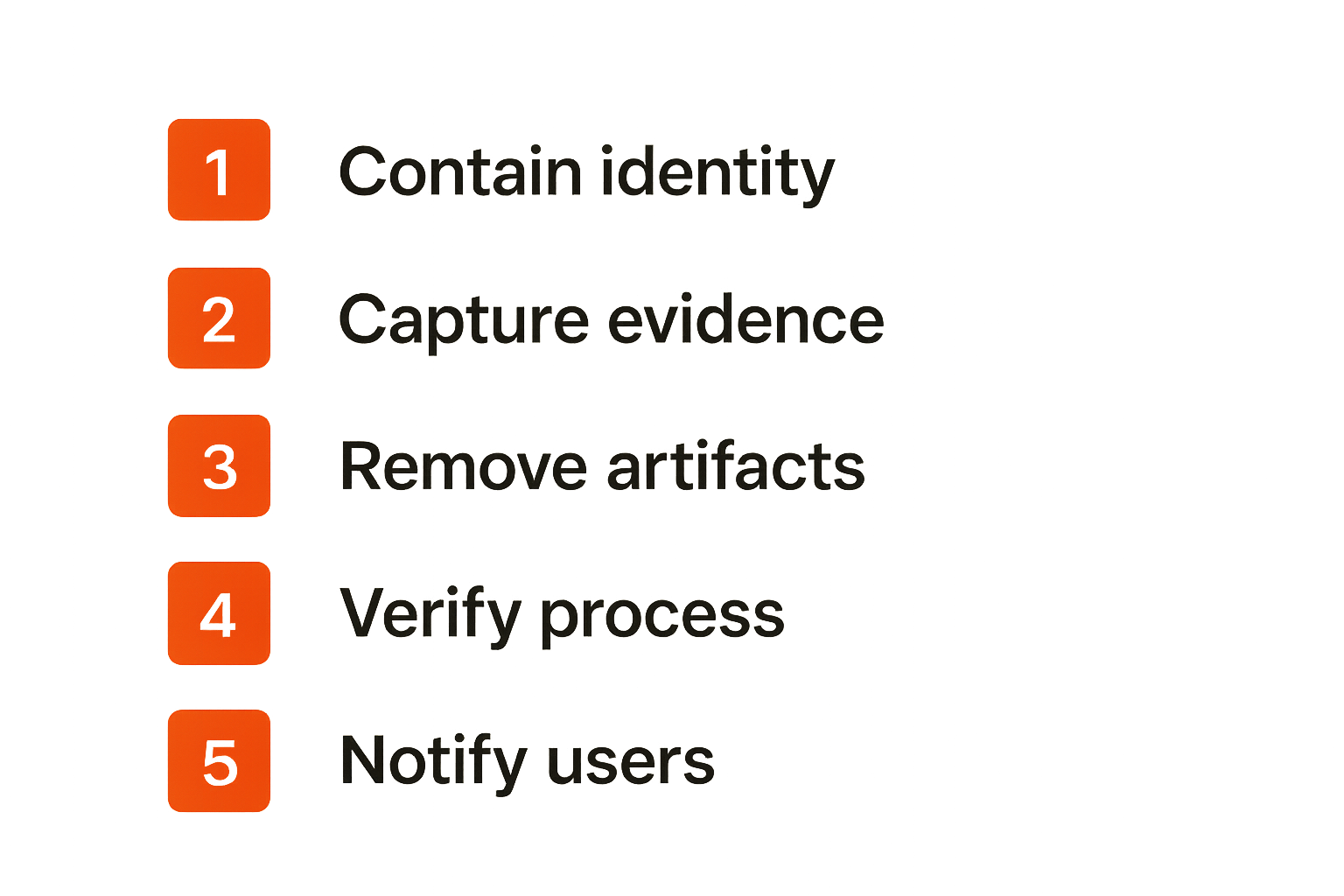
Social engineering response is a race against misuse. The best playbooks are specific to the attacker’s requested action.
Contain identity first
If credentials, MFA, or session tokens may be involved, identity containment usually comes first:
- Revoke active sessions
- Reset password
- Require MFA re-registration if the method is suspect
- Remove unauthorized MFA devices
- Review recent OAuth grants
- Disable risky app consent
- Check mailbox rules and delegated access
- Review privileged role changes
Do not treat password reset as complete containment. Token theft and OAuth abuse can survive a password change.
Preserve evidence without slowing response
Evidence matters, but it should not block containment.
Preserve:
- Original message headers
- URL screenshots and HTML where safe
- Attachment hash and sandbox output
- Message trace
- Identity timeline
- Ticket transcripts
- Call recordings if available
- Finance approval artifacts
- Endpoint process trees
- SaaS audit logs
The key is to automate evidence capture where possible. Analysts should not have to choose between pulling logs and stopping an active account takeover.
Communicate without amplifying the attack
Internal communication can accidentally spread the lure. Do not forward malicious emails broadly. Do not paste live links into chat. Do not tell users to “look for the email from X” without sanitizing indicators.
Good communication is specific and safe:
- Use screenshots or defanged URLs.
- State the requested action to avoid.
- Tell users whether to report, delete, or wait.
- Give the help desk a verification script.
- Notify finance or legal if business process abuse is involved.
Related reading from our network: operational controls in finance workflows have similar approval and reconciliation problems; the invoicing workflow discussion in Invoicing Software in 2026 is adjacent for teams thinking about payment-process abuse.
Common failure modes
Social engineering defense breaks in predictable ways. Most failures are not caused by a lack of tools. They are caused by unclear ownership and weak integration.
Treating training as the control
Training is a control input, not the control system. It can reduce risky actions and increase reporting. It cannot replace detection, containment, and verification.
What breaks:
- Users report suspicious messages, but nobody correlates them.
- Phishing simulation metrics look good while real incidents still spread.
- The organization blames clicks instead of fixing process gaps.
- High-risk users receive the same controls as low-risk users.
Awareness should feed SOC telemetry. A user report is not a survey response. It is an early warning signal.
Over-automating takedown and quarantine
Automation helps, but careless automation creates business damage. Quarantining every suspicious vendor message can stop operations. Disabling accounts based on weak signals can trigger executive escalation and analyst fatigue.
Use automation where confidence is high and rollback is possible:
- Remove confirmed malicious messages by message ID.
- Block known malicious domains and hashes.
- Revoke sessions after confirmed credential entry.
- Open tickets with prefilled evidence.
- Notify affected users with approved templates.
Require human review where business impact is high:
- Vendor payment changes
- Executive account disablement
- Legal discovery mailboxes
- Production admin accounts
- Broad SaaS app revocation
Ignoring non-email channels
Email is still central, but attackers follow users into chat, voice, SMS, social platforms, and SaaS comments. If your social engineering security definition is email-only, your controls will be email-only.
Non-email channels create hard problems:
- Weak logging in personal devices
- Limited telecom metadata
- Informal executive communication
- Guest access in collaboration tools
- Screenshots instead of raw artifacts
- Unclear reporting paths
The SOC cannot monitor everything equally. It can define high-risk workflows and require stronger verification around them.
What works and what fails
The practical split is simple: mature teams design around attacker outcomes. Immature teams design around alert categories.
What works in mature SOCs
Mature SOCs build social engineering defense as a layered workflow:
- User reporting routes into the same case system as alerts.
- Email, identity, endpoint, and SaaS events correlate by user and time.
- Playbooks map requested actions to containment actions.
- Help desk and finance have escalation paths into the SOC.
- Threat intelligence monitors lookalike domains and active campaigns.
- Metrics track time to contain, not just click rate.
- High-risk roles get stricter verification and monitoring.
These teams still get targeted. The difference is that the attack becomes visible faster.
What fails in production
Weak programs usually share these traits:
- Phishing reports go to a mailbox with slow review.
- Identity alerts are investigated separately from email alerts.
- Business process abuse is handled outside the incident process.
- Analysts lack access to SaaS audit logs.
- Playbooks stop at “block sender.”
- Metrics focus on training performance, not incident reduction.
- Executives bypass controls due to urgency.
The mistake teams make is optimizing the first alert instead of the full incident path.
Comparison table
| Area | Weak approach | Strong approach |
|---|---|---|
| Definition | Social engineering equals phishing | Social engineering equals manipulation of trust, access, or process |
| Signal model | Email gateway verdicts | Email, identity, endpoint, SaaS, help desk, finance signals |
| Triage | Message classification | Requested action and exposure classification |
| Response | Block sender and delete email | Contain identity, remove artifacts, verify business process, preserve evidence |
| Metrics | Click rate and training completion | Time to detect, time to contain, action completion rate, recurrence |
| Ownership | Security awareness team | SOC-led workflow with IAM, IT, finance, legal, and business owners |
This table is not theoretical. It reflects what breaks in practice when a campaign crosses from inbox to identity to payment approval.
Measuring social engineering defense
You cannot manage social engineering risk with only simulation click rates. Those numbers are easy to collect, but they do not show whether the SOC can stop real attacker outcomes.
Metrics that matter
Track metrics tied to operational performance:
- Time from delivery to user report
- Time from report to triage
- Time from triage to containment
- Percentage of reported messages enriched automatically
- Percentage of suspicious contacts correlated with identity activity
- Number of users targeted per campaign
- Number of users who completed attacker-requested action
- Session revocation time after credential exposure
- Payment or process changes stopped before execution
- Repeat targeting by domain, vendor, role, or business unit
A useful metric should change a decision. If leadership cannot use the number to fund, prioritize, or fix something, it is probably noise.
Validation exercises
Validation should test workflow, not just user clicks.
Run exercises that include:
- A reported phishing email followed by a simulated risky login
- A fake help desk reset request for a privileged user
- A vendor bank-change request routed through finance
- An OAuth consent lure targeting SaaS users
- A chat impersonation scenario involving an executive
- A lookalike domain discovered before delivery
For each exercise, measure whether the right teams were involved, whether evidence was captured, whether containment happened, and whether the business process held.
Reporting to leadership
Leadership does not need a lecture on pretexting taxonomy. They need to know whether the company can resist manipulation of high-value workflows.
Report in business terms:
- Which workflows are most targeted?
- Which roles are most exposed?
- Which controls stopped real or simulated attacks?
- Which response steps are too slow?
- Which business units need stronger verification?
- Which tools are not integrated into the SOC view?
That framing turns social engineering from a people problem into an operational risk program.
Product fit: where ThreatCrush belongs
A social engineering program needs current context: attacker infrastructure, lookalike domains, suspicious indicators, vulnerability exposure, threat actor behavior, and internal sightings. That context has to reach the analyst while the case is still active.
Connecting threat intelligence to SOC workflow
Threat intelligence is useful when it changes triage or response. For social engineering, that means enriching artifacts quickly:
- Is this domain newly registered?
- Is it linked to known phishing infrastructure?
- Has this sender or URL appeared in other campaigns?
- Is the targeted business unit exposed in current threat reporting?
- Are leaked credentials available for the user or domain?
- Does the attacker infrastructure overlap with known actor behavior?
ThreatCrush is built for security operations professionals building and scaling SOC capabilities, with real-time threat intelligence that can support these enrichment and prioritization decisions. The product fit is not “more feeds.” It is getting relevant context into the workflow where analysts decide severity and containment.
Where automation helps
Automation should remove repetitive analyst work:
- Enrich URLs, domains, IPs, hashes, and identities.
- Pull related sightings across internal telemetry.
- Attach threat context to the case.
- Recommend containment based on requested action.
- Flag lookalike infrastructure before delivery.
- Update blocklists after analyst approval.
This is where a platform approach can reduce queue time. If enrichment requires five browser tabs and three manual searches, analysts will skip steps under pressure.
Where humans still own the call
Humans still own judgment around business impact. A tool can identify that a vendor domain is suspicious. It cannot always decide whether a payment should be paused, whether an executive account can be disabled immediately, or whether a legal mailbox has special preservation requirements.
The right model is assisted decision-making: automate enrichment, standardize evidence, recommend actions, and preserve analyst control over high-impact containment.
Closing: make social engineering measurable
The social engineering security definition that matters in 2026 is operational. It should tell your SOC what to collect, how to correlate it, when to escalate, and which containment action stops the attacker’s goal.
The practical takeaway
Do not stop at “social engineering manipulates people.” That is true, but it is not enough to run a SOC.
Define social engineering as manipulation of trust, access, or business process. Build detections around requested actions. Correlate user reports with identity, endpoint, SaaS, and help desk events. Measure containment speed and business process resilience.
If your definition does not improve the workflow, it is just vocabulary.
Try threatcrush.com
ThreatCrush publishes practical guidance for security operations professionals building and scaling SOC capabilities. Try threatcrush.com.
Try ThreatCrush
Real-time threat intelligence, CTEM, and exposure management — built for security teams that move fast.
Get started →