SaaS Incident Response: A Practical Architecture for SOC Teams in 2026

SaaS incident response is where many SOC processes start to look clean on paper and messy in production.
The alert says a user created a suspicious OAuth grant. The identity provider has one version of the story. The SaaS admin console has another. The CASB has partial context. The ticket has a screenshot. Legal wants to know whether data left the tenant. The business owner wants the user account restored before the next customer call.
Teams think the problem is SaaS visibility. The real problem is incident workflow across systems that were never designed to share a single truth.
That changes the conversation. SaaS incident response is not just a playbook for Google Workspace, Salesforce, Slack, GitHub, or Microsoft 365. It is an architecture problem: signals, evidence, ownership, containment, validation, and recovery have to move through the same operating model. This guest contribution from the team at saasrow.com takes that operator view: SaaS is productivity infrastructure, but in an incident it behaves like a distributed control plane.
The practical question is not whether your SOC has SaaS alerts. It is whether your team can turn those alerts into a defensible incident record and take action without losing context.
Table of contents
- Why SaaS incident response fails in production
- Define the incident object before the tool
- Build a SaaS incident response architecture
- Triage without drowning the SOC
- Containment patterns for SaaS platforms
- Investigation workflow that preserves context
- Automation that helps instead of hiding risk
- SaaS IR playbooks your team should actually maintain
- What breaks when implementation is bad
- Operationalizing SaaS incident response with ThreatCrush
Why SaaS incident response fails in production
The UI is not the incident boundary
The mistake teams make is treating the SaaS admin console as the source of incident truth. It is usually only one surface.
A SaaS incident may involve identity provider logs, endpoint telemetry, browser session artifacts, cloud access logs, email events, OAuth consent records, file sharing metadata, admin activity, network egress, and user interviews. No single SaaS UI will preserve all of that in the structure an incident responder needs.
The UI is useful for action. It is weak as a system of record. Screenshots get stale. Export formats change. Admin roles may not expose the exact event needed. Some SaaS products make audit logs available only on higher tiers, and even then retention may be shorter than your investigation window.
Practical rule: Treat every SaaS console as an action surface, not as the incident case file.
A useful way to think about it is this: the incident boundary is wherever the actor, identity, token, data object, or business process moved. If a stolen session token in one product was used to access data in another, your response boundary crossed systems even if the first alert came from only one tool.
Why now: identity, APIs, and connected SaaS
SaaS used to mean a few business applications. In 2026, it often means the operating layer for engineering, sales, finance, support, HR, and customer communication.
That creates three changes for incident response.
First, identity is the main path. Attackers do not need malware if they can reuse a token, consent to an application, bypass weak conditional access, or trick a user into approving access.
Second, APIs turn normal business automation into lateral movement paths. A compromised integration can export tickets, source code, documents, invoices, or customer records without touching a traditional endpoint.
Third, SaaS data is collaborative by design. Sharing, external guests, public links, synced folders, and connected apps create exposure states that are hard to reason about during a live incident.
The workflow problem behind the keyword
When someone searches for SaaS incident response, they usually want a plan. The better answer is a workflow architecture.
A plan says: if alert X, do Y.
A workflow architecture says: when a signal arrives, normalize it, enrich it, bind it to an identity and asset, evaluate severity, preserve evidence, assign ownership, execute containment, validate effect, document business impact, and close only when recovery conditions are met.
That is less catchy, but it is what works in production.
Define the incident object before the tool
Incident state model
Before buying another SaaS security tool or building another integration, define what an incident is allowed to be in your environment.
A practical SaaS incident object should include:
- Incident ID and parent case relationship
- Triggering signal and source system
- Affected user, group, tenant, workspace, repository, channel, or business unit
- Identity context, including MFA state and session status
- Data objects involved, if known
- External parties, guests, vendors, or integrations
- Current state: new, triaged, contained, investigating, eradicated, recovered, closed
- Required approvals
- Evidence references
- Customer, legal, privacy, or compliance impact
This object matters because SaaS incidents rarely stay inside one queue. The SOC may own triage. IT may own account actions. App admins may own tenant changes. Legal may own notification decisions. Detection engineering may own rule tuning after closure.
If the incident object is weak, every handoff becomes a translation exercise.
Evidence custody
Evidence custody sounds formal, but for SaaS it is mostly about not losing the facts.
Do not rely on ephemeral views. Export logs when possible. Capture API responses with timestamps. Store original alert payloads. Record who performed each containment action. Preserve before and after state for high-risk changes such as external sharing removal, OAuth revocation, admin role changes, or mass session invalidation.
What breaks in practice is that teams contain too quickly without preserving the state needed to answer later questions. That may be acceptable for low-severity events. It is not acceptable when customer data, regulated data, privileged access, or executive accounts are involved.
Practical rule: If the action changes the evidence, capture the evidence first or record why you could not.
Severity and business impact
SaaS severity should not be based only on alert type. A suspicious login to a dormant test account is not the same as a suspicious login to a finance admin with access to invoices and banking workflows.
Use a severity model that combines:
| Dimension | Low signal | High signal |
|---|---|---|
| Identity | Standard user | Admin, executive, service owner |
| Data | Public or low sensitivity | Customer, source, financial, regulated |
| Scope | Single object | Tenant-wide or many objects |
| Persistence | One failed attempt | Token, OAuth grant, app password, API key |
| Business process | No operational dependency | Revenue, payroll, customer support, deploy pipeline |
The practical question is: what could the actor do from this position, and did they do it?
Build a SaaS incident response architecture
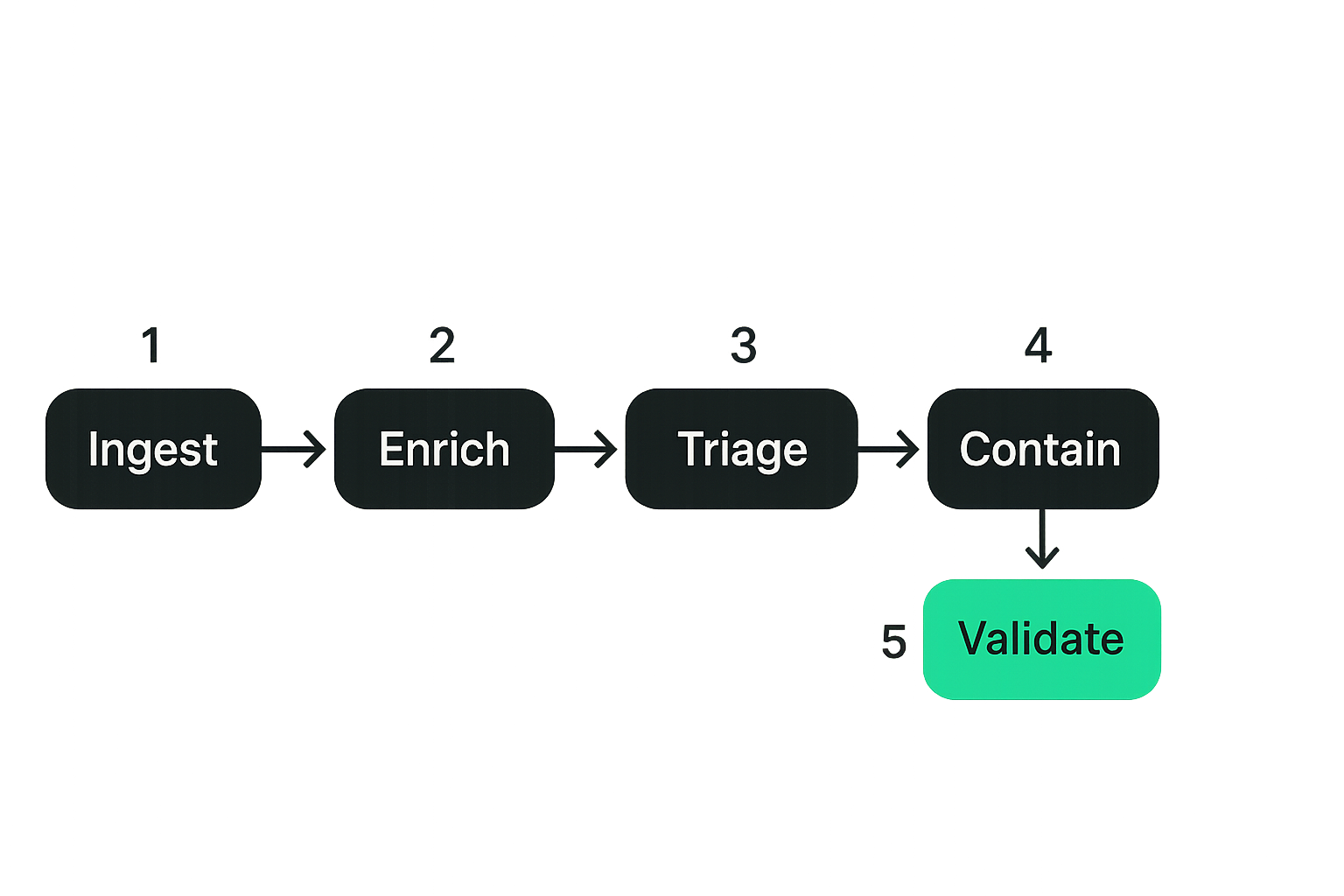
Signal ingestion
SaaS incident response starts before the incident. You need a reliable signal pipeline.
Ingest the logs and events that actually support decisions:
- Authentication and conditional access events
- Session creation and session revocation events
- Admin role assignment and privilege changes
- OAuth consent, app installation, and integration changes
- File sharing, export, download, and permission changes
- Mailbox rules, forwarding, and delegation
- Repository clone, token use, secret exposure, and deploy activity
- Collaboration events such as guest invitations and channel exports
Not every source deserves equal priority. Start with platforms that hold sensitive data or control business operations. Then add long-tail SaaS sources using risk tiers.
A minimal event should carry source, timestamp, actor, target, action, result, IP, user agent, tenant, and raw payload reference. If the source cannot provide those fields, document the limitation. Hidden limitations cause bad incident decisions later.
Enrichment and correlation
Raw SaaS events need context before they are useful.
Enrichment should answer practical questions:
- Is this user active, terminated, privileged, executive, or external?
- Is the IP expected for this user or geography?
- Was there an endpoint alert near the same time?
- Did the user recently complete MFA or reset a password?
- Does the OAuth app have risky scopes?
- Is the target object sensitive?
- Has this event pattern appeared for other users?
Correlation is not just matching fields. It is connecting behavior. A login from a new ASN, followed by OAuth consent, followed by mailbox rule creation, followed by file downloads is a story. Each event alone may look medium priority. Together they look like compromise.
Orchestration handoffs
SaaS incidents often require teams outside the SOC. You need handoffs that are explicit.
A good handoff includes:
- What happened
- What is known versus assumed
- What action is requested
- What risk the action reduces
- What evidence must be preserved
- Who approves disruptive action
- How success will be verified
Bad handoffs sound like: please check Salesforce. Good handoffs sound like: verify whether user X exported reports Y and Z between 14:02 and 14:18 UTC, preserve export audit entries, and confirm whether external sharing was enabled before containment.
That level of detail reduces loops and keeps the incident moving.
Triage without drowning the SOC
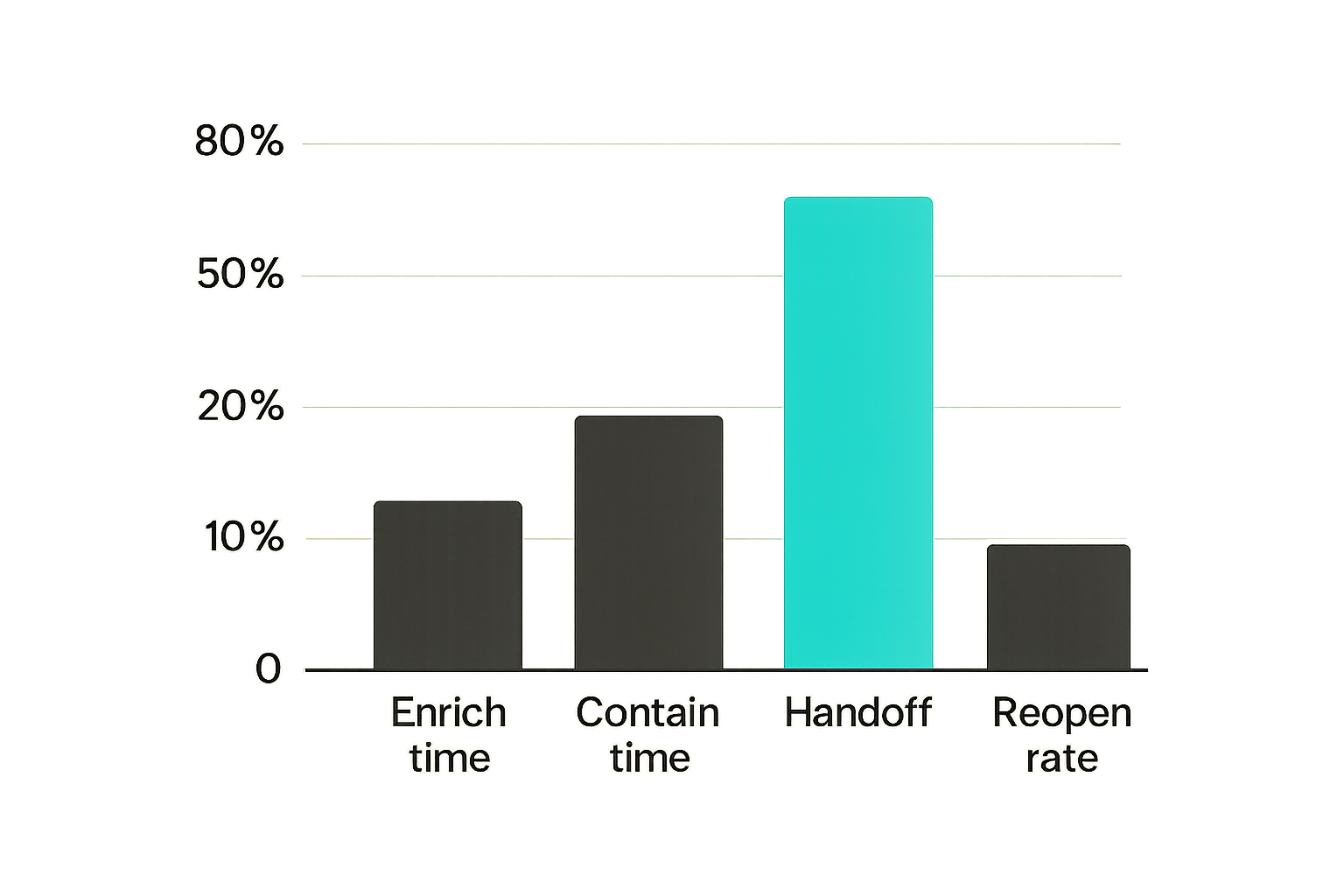
Good signals versus noisy events
The difference between SaaS monitoring and SaaS incident response is triage discipline.
Many SaaS events are noisy because SaaS is used everywhere. People travel. Integrations rotate tokens. Users join external workspaces. Admins make configuration changes. Automation creates bursts of activity.
Good signals have at least one of these properties:
- They imply privilege change
- They imply persistence
- They imply data movement
- They contradict known user context
- They affect a sensitive business process
- They chain with other suspicious events
Weak signals are not useless. They are inputs. The mistake teams make is sending every weak signal directly to an analyst as if attention were free.
Practical rule: A SaaS alert should either trigger a decision or enrich a future decision. If it does neither, it is telemetry, not an alert.
Prioritization rules
Use deterministic triage rules before asking analysts to make judgment calls. Judgment is valuable, but it should be applied after basic routing and enrichment.
Example prioritization logic:
- Critical if privileged identity plus suspicious session plus sensitive data access.
- High if persistence mechanism was created, such as OAuth grant, mailbox rule, API token, or external admin role.
- High if multiple users show the same suspicious pattern in a short window.
- Medium if unusual access occurred without evidence of data movement or persistence.
- Low if event is explainable by known travel, approved integration, or expected admin activity.
This does not remove analyst work. It focuses analyst work on cases where their context matters.
Metrics that actually help
Avoid vanity metrics like total SaaS alerts processed unless you pair them with quality indicators.
Useful metrics include:
| Metric | Why it matters | Bad interpretation to avoid |
|---|---|---|
| Time to enrich | Shows pipeline efficiency | Faster is not better if enrichment is shallow |
| Time to contain | Measures response speed | Must be tied to evidence preservation |
| False positive by rule | Guides detection tuning | Do not suppress hard-but-important detections blindly |
| Handoff latency | Reveals ownership gaps | Do not blame teams without clear SLAs |
| Reopen rate | Shows closure quality | Some reopened cases indicate healthy review |
Metrics should change behavior. If a dashboard does not lead to a playbook update, integration fix, or ownership decision, it is probably reporting theater.
Containment patterns for SaaS platforms
Identity containment
Identity containment is usually the first lever, but it is easy to overuse.
Common actions include:
- Disable account
- Force password reset
- Revoke sessions
- Revoke refresh tokens
- Require MFA re-registration
- Remove risky device trust
- Remove temporary admin roles
- Disable legacy protocols
The practical question is whether the suspected actor still has a path. If you reset a password but leave an OAuth grant, refresh token, app password, API token, or active session alive, you may have performed visible containment without effective containment.
For executive and admin accounts, create a separate containment checklist. These accounts often have delegation, shared mailboxes, privileged groups, and recovery paths that normal users do not.
Data and sharing containment
SaaS data containment is less clean than endpoint isolation. You are not just isolating a host; you are changing access relationships.
Actions may include:
- Remove public links
- Disable external sharing
- Remove guest users
- Revoke file permissions
- Quarantine documents
- Lock repositories
- Rotate secrets
- Freeze exports or reports
The risk is collateral damage. Removing all external access may break customer support, partner workflows, or sales operations. That does not mean you avoid action. It means you need pre-approved containment tiers.
Example tiers:
| Tier | Action style | Use when |
|---|---|---|
| Narrow | Revoke one token, link, or permission | Scope is well understood |
| User-level | Disable or restrict one account | Account compromise is likely |
| App-level | Disable integration or app access | Integration is suspected |
| Tenant-level | Restrict external sharing broadly | Exposure is active or scope unknown |
Vendor and tenant containment
Some SaaS incidents require vendor involvement. This is especially true when logs are missing, activity is ambiguous, or tenant-level compromise is suspected.
Prepare vendor escalation paths before incidents. Know support tiers, emergency contacts, required tenant IDs, admin contacts, and what logs the vendor can provide.
What works is having a short vendor incident packet ready: tenant, timeframe, users, suspected actions, business impact, requested evidence, requested containment help, and legal contact if needed.
What fails is opening a vague support ticket during a high-severity incident and hoping the vendor will infer urgency.
Investigation workflow that preserves context
Timeline reconstruction
SaaS investigations should converge on a timeline. Without one, teams argue about isolated events.
Build the timeline around five anchors:
- Initial access or earliest suspicious activity.
- Privilege or persistence change.
- Data access, export, sharing, or modification.
- Containment action.
- Validation and recovery.
Each timeline entry should include timestamp, source system, actor, action, target, confidence, and evidence reference. Confidence matters because SaaS logs can be incomplete or delayed. Marking an event as inferred is better than pretending it is proven.
A useful timeline lets responders answer: what did the actor have, what did they touch, what changed, and what access remains?
API and audit log gaps
SaaS APIs are not incident response APIs by default. They are product APIs with security use cases bolted on later.
Expect issues such as:
- Pagination that drops events if handled poorly
- Rate limits during bulk collection
- Delayed audit events
- Different timestamp formats
- Missing IP or user agent fields
- Admin actions logged differently than user actions
- Retention limits
- Scope restrictions for security integrations
Build collectors defensively. Store cursors. Use retries with backoff. Preserve raw payloads. Detect gaps. Alert on collector failure. A log pipeline that silently stops is worse than no pipeline because analysts trust it.
Case notes and decision records
Case notes are not clerical work. They are how the team remembers why it acted.
Record decisions like:
- Why severity was raised or lowered
- Why containment was delayed
- Why a disruptive action was approved
- Why data exposure was considered likely or unlikely
- Which evidence was unavailable
- Which assumptions require follow-up
This is especially important for SaaS incidents because many actions are reversible technically but not operationally. Revoking access, removing guests, disabling integrations, or rotating tokens can cause business disruption. Decision records protect the team from hindsight confusion.
Automation that helps instead of hiding risk
Safe automation
Automation should remove repeatable work, not hide uncertainty.
Good automation:
- Normalizes event fields
- Enriches identities and assets
- Pulls recent activity around the alert
- Checks known risky OAuth scopes
- Opens or updates a case
- Suggests containment options
- Executes low-risk actions with clear guardrails
Unsafe automation disables accounts, deletes integrations, removes sharing, or rotates credentials without enough context. Sometimes that is necessary. But if you cannot explain why the automation acted, you cannot defend the response.
Practical rule: Automate evidence collection before destructive containment. Automate destructive containment only when the trigger and rollback path are clear.
Human approval points
Human approval is not a weakness. It is a control plane for business risk.
Require approval for actions that affect:
- Executives
- Production engineering workflows
- Customer-facing systems
- Finance and payroll
- Legal holds or regulated data
- Broad external collaboration
- Tenant-wide policy changes
Approvals should be fast and structured. Do not make analysts hunt through chat to find someone with authority. Put approvers in the playbook, ticket template, or orchestration flow.
Idempotency and rollback
Incident automation should be safe to retry. SaaS APIs fail. Rate limits happen. Permissions change. If a playbook runs twice, it should not create a new mess.
For every action, define:
- Pre-check: is the action still needed?
- Execution: what exact API or admin action runs?
- Post-check: did the state change as expected?
- Rollback: how do we restore access if needed?
- Audit: where is the action recorded?
Idempotency is not just for developers. It is operational hygiene for SOC automation.
SaaS IR playbooks your team should actually maintain
Account takeover
Account takeover is the core SaaS incident response playbook because so many other incidents start there.
Minimum workflow:
- Confirm suspicious authentication or session behavior.
- Pull recent user activity across core SaaS apps.
- Check MFA changes, password resets, recovery changes, and device trust.
- Revoke active sessions and refresh tokens.
- Reset credentials and require MFA validation.
- Review mailbox rules, forwarding, delegated access, OAuth grants, and API tokens.
- Identify data access, export, or sharing changes.
- Restore account access only after validation.
- Tune detections based on observed path.
What works is treating the account as a bundle of access paths. What fails is treating password reset as the end of containment.
Malicious OAuth app
Malicious OAuth consent is a persistence problem disguised as user approval.
The playbook should collect app name, publisher, client ID, scopes, consent time, consenting user, affected users, accessed resources, and any related sign-ins. Then decide whether to revoke user consent, block the app, disable tenant-wide consent, or investigate additional users.
Risk depends on scopes. Read-only may still be serious if it includes email, files, contacts, repositories, or CRM data. Write scopes can enable mailbox manipulation, file modification, or workflow changes.
Do not just remove the app. Preserve scope and access evidence first when severity warrants it.
Data exposure
Data exposure playbooks need a different rhythm because the containment action may destroy visibility into exposure state.
A practical workflow:
- Identify the data object or repository.
- Capture current permissions, public links, guests, and sharing history.
- Determine sensitivity and owner.
- Identify access and download activity during the exposure window.
- Remove or restrict access.
- Validate that access paths are closed.
- Document likely exposure and unknowns.
- Route to legal, privacy, or customer communication if required.
This playbook should be tested with realistic SaaS objects, not generic mock incidents. File sharing, ticket exports, source repositories, and CRM reports each behave differently.
What breaks when implementation is bad
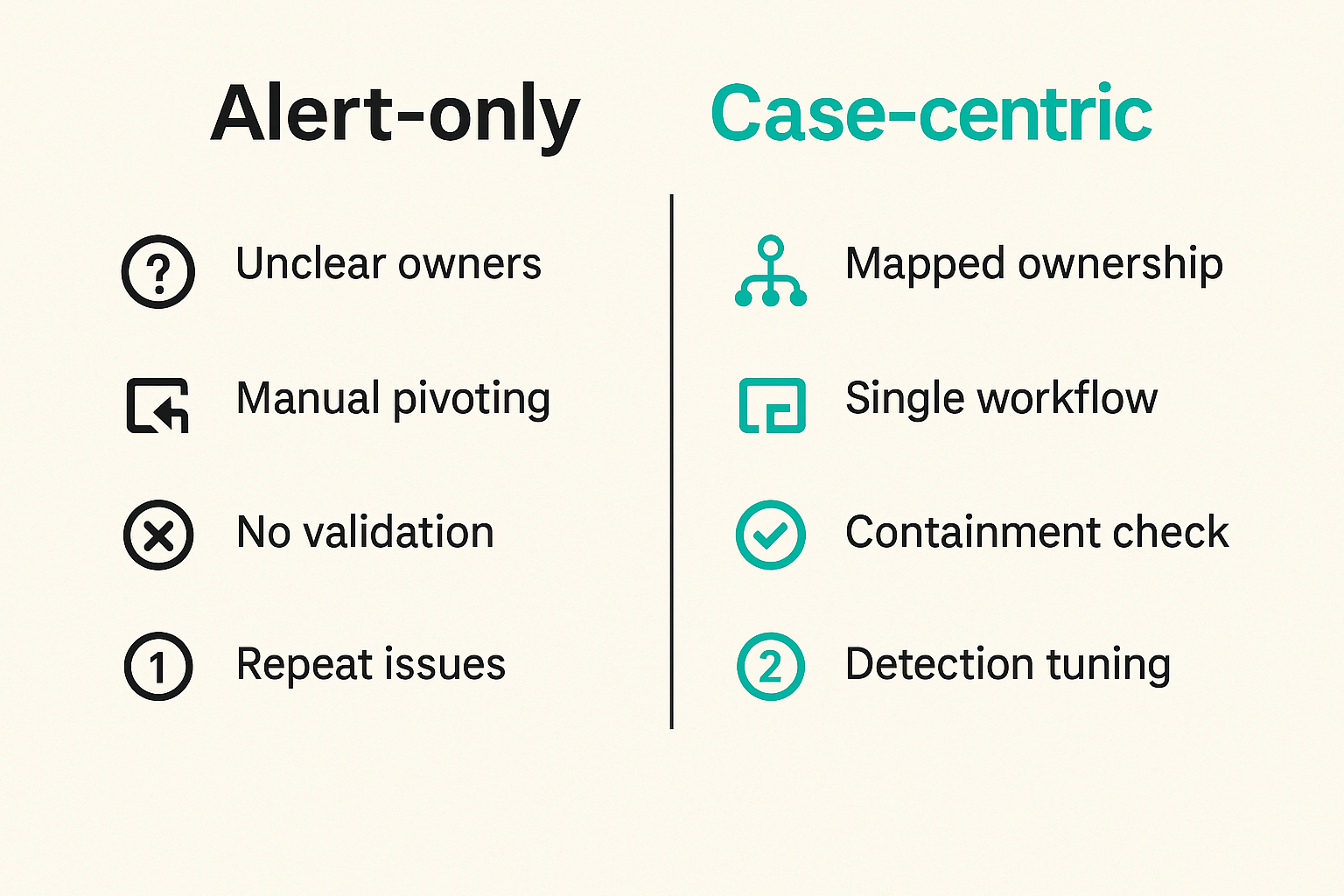
Ownership gaps
The most common failure mode is unclear ownership.
The SOC sees the alert but cannot revoke the token. IT can revoke the token but does not know whether evidence is preserved. The SaaS admin can change sharing but does not know whether legal needs a snapshot. The business owner wants service restored but does not know the remaining risk.
Ownership must be mapped by action, not by department name.
| Action | Primary owner | Backup owner | Approval needed |
|---|---|---|---|
| Revoke user sessions | IAM or IT | SOC automation | Sometimes |
| Remove OAuth grant | SaaS admin | IAM | For broad app block |
| Disable integration | App owner | Platform team | Usually |
| Preserve export logs | SOC | App admin | No |
| Notify customer team | Incident lead | Legal or privacy | Yes |
If nobody owns an action before the incident, nobody owns it during the incident.
Alert-only thinking
Alert-only thinking creates a false sense of maturity. The SOC sees more SaaS events, but response does not improve.
Symptoms include:
- Alerts lack business context
- Analysts pivot manually through many consoles
- Cases close without containment validation
- No one knows whether data moved
- Repeat incidents do not change detections
- SaaS admins are pulled in late and without clear asks
The fix is not fewer alerts by default. The fix is better alert contracts. Every high-priority alert should state what decision it supports and what enrichment is required.
Tool sprawl
SaaS security tooling can fragment quickly: SIEM, SOAR, CASB, SSPM, ITDR, IdP, EDR, SaaS-native consoles, data security tools, and ticketing systems. Each may be useful. Together they can slow the incident if no one owns the operating model.
A useful comparison:
| Approach | What works | What fails |
|---|---|---|
| Console-driven | Fast for one-off admin action | Weak evidence record and poor cross-app context |
| SIEM-only | Central search and correlation | Often weak containment and ownership workflow |
| SOAR-only | Repeatable actions | Dangerous if signals and approvals are poor |
| Case-centric architecture | Shared state, evidence, handoffs, validation | Requires upfront design and maintenance |
The goal is not to have one tool for everything. The goal is to prevent every incident from becoming a tour of disconnected tools.
Operationalizing SaaS incident response with ThreatCrush
Product-fit checklist
ThreatCrush readers already know the pattern from detection engineering: signals are only useful when they connect to workflow. The same is true for SaaS incident response.
A platform fit is strong when it helps your team:
- Reduce noisy SaaS alert handling
- Connect proactive exposure context with reactive incident work
- Preserve investigation context across tools
- Route ownership cleanly between SOC, IT, and app owners
- Validate containment instead of assuming it worked
- Feed lessons back into detections and playbooks
A poor fit is any tool that adds another dashboard without improving the incident path. Dashboards can be useful. They are not a response model.
Implementation sequence
Do not try to onboard every SaaS platform at once. Start with the systems where compromise would hurt most.
A practical implementation sequence:
- Pick the first three critical SaaS platforms by data sensitivity and operational dependency.
- Define the incident object and required evidence fields.
- Map owners for identity, app admin, legal, privacy, and business actions.
- Ingest core events and preserve raw payload references.
- Add enrichment from identity, asset, user, and data context.
- Build three playbooks: account takeover, malicious OAuth app, and data exposure.
- Automate evidence collection and low-risk enrichment first.
- Add containment actions with approval gates and rollback steps.
- Run tabletop exercises using real admin consoles and API limits.
- Review metrics monthly and update detections, playbooks, and ownership maps.
This sequence keeps the work grounded. It also prevents a common failure: building automation before the team agrees what the incident actually is.
The closing point is simple. SaaS incident response is not a narrow SaaS admin task. It is a SOC operating model for identity, data, integrations, and business workflows.
Try threatcrush.com
ThreatCrush helps security teams think in workflows: detection, context, response, and validation. If you are building SaaS incident response that has to work under pressure, Try threatcrush.com.
Try ThreatCrush
Real-time threat intelligence, CTEM, and exposure management — built for security teams that move fast.
Get started →