Peptide Threat Hunting: Building a SOC Workflow for Biotech, Pharma, and Lab Data Risk

Peptide threat hunting sounds like a niche search problem until a SOC has to investigate it at 2 a.m. The alert is rarely clean. A researcher downloads a large sequence library. A contractor accesses a shared drive after a project ends. A synthesis request changes destination. A cloud notebook pulls data from an unusual region.
Teams think the problem is finding the right detection query. The real problem is that peptide research, lab workflows, identity systems, cloud storage, and collaboration tools all describe the same activity differently.
That changes the conversation. Peptide threat hunting is not a definition exercise. It is an architecture and workflow decision: what data matters, who owns it, how the SOC builds context fast, and how suspicious movement becomes an investigation instead of another noisy ticket.
In 2026, this matters because biotech and pharma environments are more connected than they used to be. Lab automation, outsourced research, AI-assisted discovery, cloud notebooks, file-sharing platforms, and external manufacturing partners all create normal-looking activity that can also look like theft, sabotage, or misuse.
Table of contents
- Peptide threat hunting is an ownership problem, not a query pack
- What makes peptide environments different for hunters
- The data model for peptide threat hunting
- Signals that matter more than signatures
- A practical peptide threat hunting workflow
- Detection engineering patterns that survive production
- What breaks when peptide threat hunting is implemented badly
- What works: operating rules for SOC teams
- Where automation helps and where it hurts
- Product fit: connecting peptide hunts to ThreatCrush workflows
Peptide threat hunting is an ownership problem, not a query pack
The mistake teams make is treating peptide threat hunting like a special SIEM content pack. They add a few searches for large downloads, failed logins, or impossible travel and call it a program. That can help, but it does not solve the real operational problem.
Peptide-related risk usually crosses boundaries. A sequence file may start in an ELN, move to a cloud bucket, get copied into a notebook, appear in a collaboration folder, and later become part of a synthesis or CRO handoff. Each system has logs. None of those logs alone tells the story.
The threat surface is not one system
A useful way to think about it is to map the peptide workflow as a business process first, then overlay telemetry. Typical systems include:
- Electronic lab notebooks and LIMS platforms
- Cloud object storage and data lakes
- Git repositories and model notebooks
- Identity providers and privileged access systems
- Collaboration suites and file-sharing tools
- Lab automation controllers and instrument workstations
- Vendor portals for synthesis, shipping, or outsourced research
- Ticketing, procurement, and contract management systems
The practical question is not whether each tool logs something. It is whether the SOC can connect activity across tools into one investigation timeline.
Practical rule: If a peptide asset can move through a system, that system belongs in the hunt scope even if it is not labeled as a security tool.
The operating model has to cross lab, cloud, and SOC
Security teams often discover too late that lab operations own the context, IT owns the identity layer, research owns the data, and the SOC owns the alert. That split is normal. It also breaks investigations.
The SOC needs a pre-agreed operating model:
- Which peptide projects are sensitive enough to warrant enhanced monitoring?
- Which systems hold authoritative project membership?
- Which teams can explain expected research behavior?
- Which events require legal, IP, or executive escalation?
- Which response actions are safe in a lab environment?
As a guest contribution, the team at coinpayportal.com sees a similar pattern in payment infrastructure: the visible transaction is only a small part of the control problem, and the real work is state, ownership, reconciliation, and trustworthy handoffs.
What makes peptide environments different for hunters
Peptide environments are not just another set of file shares. They combine high-value intellectual property, experimental uncertainty, external collaboration, and systems that were not always built with SOC-grade logging in mind.
Research data has weird value and weird movement
A conventional data loss program might look for customer records, financial files, or source code. Peptide research does not always fit those patterns. The most sensitive asset may be a small dataset, a naming convention, a notebook, a failed experiment trail, or a synthesis instruction that only matters when combined with other context.
Movement is also unusual. A researcher may legitimately export data to a notebook, share a dataset with a CRO, upload files to an instrument vendor portal, or copy results for grant reporting. Those actions can be normal. They can also be exfiltration paths.
| Area | Generic enterprise hunting | Peptide threat hunting |
|---|---|---|
| Primary asset | Documents, credentials, source code | Sequences, assays, synthesis data, notebooks |
| Normal movement | Email, SaaS, endpoints | Lab systems, cloud notebooks, CRO portals |
| Context owner | IT or app owner | Research, lab ops, program lead |
| Detection challenge | Volume and user behavior | Scientific workflow ambiguity |
| Response risk | Business disruption | Experiment loss, lab downtime, IP exposure |
Lab infrastructure creates security blind spots
What breaks in practice is telemetry coverage. Instrument workstations may run old operating systems. Lab networks may be segmented in ways that make logging inconsistent. Vendor-managed systems may have limited audit trails. Shared lab accounts still exist in some environments because workflows were built around convenience.
That does not mean the SOC should give up. It means hunts need compensating controls. If the instrument workstation cannot produce rich logs, monitor identity access, network egress, file staging locations, and downstream collaboration platforms. If the vendor portal has weak audit exports, track request metadata, approval paths, and data packages before upload.
Practical rule: Hunt where the evidence is durable, not only where the sensitive activity begins.
The data model for peptide threat hunting
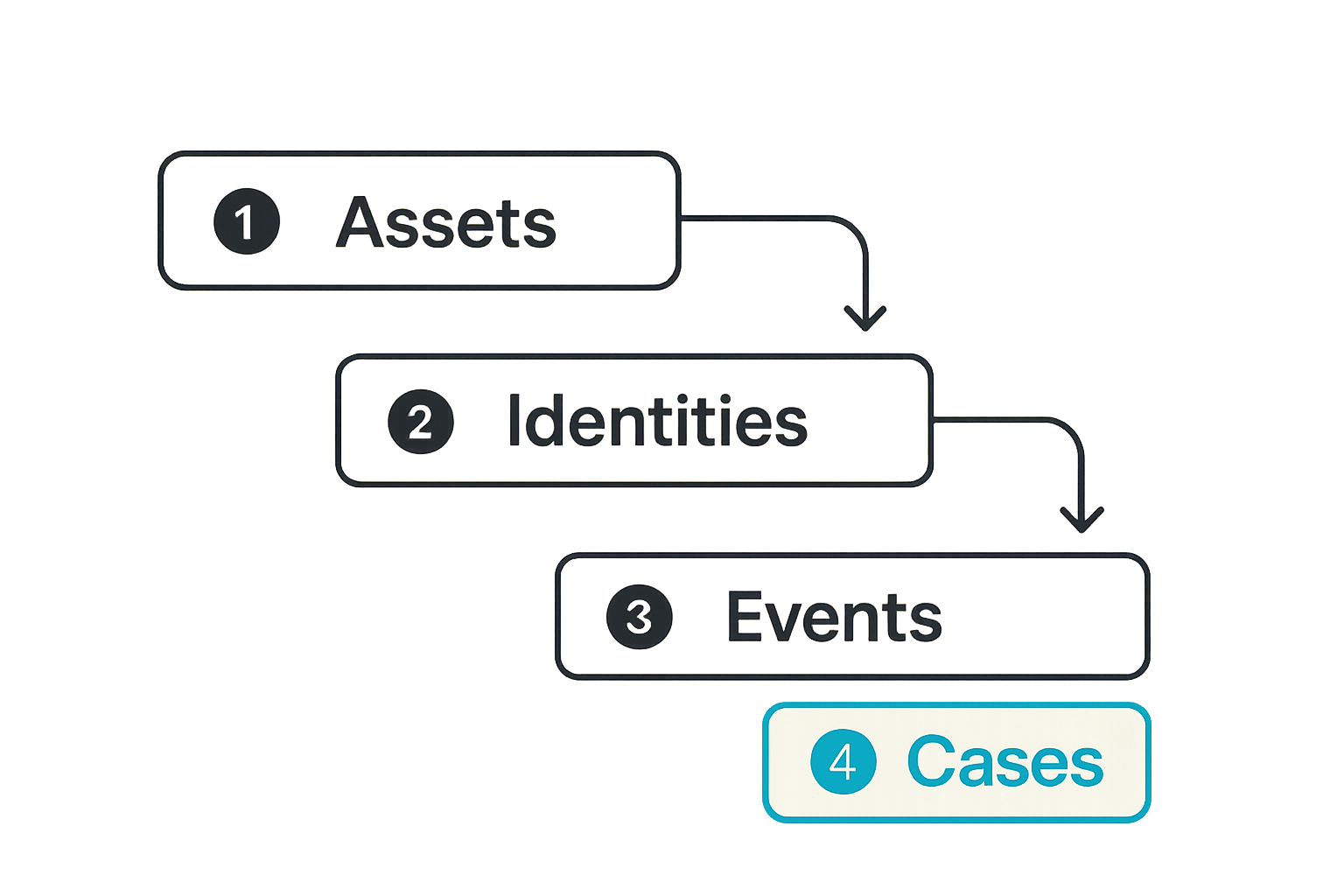
A peptide threat hunting program needs a data model before it needs more detections. Without a model, every alert becomes a custom research project. Analysts waste time asking basic questions: what project is this, who should have access, where did the file come from, and what does this destination mean?
Start with entities, not alerts
Start by defining the entities the SOC must recognize. At minimum, build lookup tables or enrichment sources for:
- Users, contractors, service accounts, and lab shared accounts
- Projects, programs, compound families, and sensitivity tiers
- Data repositories, folders, buckets, and notebook workspaces
- Instruments, lab subnets, jump hosts, and workstations
- CROs, CDMOs, synthesis vendors, and external collaborators
- Approved transfer methods and expected destinations
This can be lightweight. It does not need to be a perfect CMDB. A small, maintained table of critical projects and allowed collaboration paths is better than an enterprise inventory that is always six months behind.
Example enrichment shape:
asset_id: peptide_project_alpha
sensitivity: restricted
owner: research_program_lead
approved_groups:
  - peptide-alpha-core
  - peptide-alpha-analytics
approved_external_partners:
  - cro-west-01
approved_transfer_channels:
  - managed_sftp
  - approved_collaboration_folder
watch_events:
  - bulk_download
  - permission_change
  - external_share
  - unusual_notebook_export
Normalize events into a huntable timeline
The SOC should be able to answer one question quickly: what happened to this peptide asset across systems?
That requires normalization. You do not need every source to match a perfect schema, but you do need consistent fields:
- Actor: user, service account, API key, device, partner identity
- Asset: project, dataset, sequence file, folder, bucket, notebook
- Action: read, export, share, modify, delete, synthesize, approve
- Location: host, subnet, cloud region, SaaS tenant, external domain
- Time: event time, ingestion time, business calendar context
- Outcome: success, failure, partial, blocked, approved
Without this structure, hunts stay trapped inside individual tools. With it, analysts can pivot from a suspicious share to identity events, endpoint activity, network egress, and vendor workflow changes.
Signals that matter more than signatures
For peptide threat hunting, signatures are rarely enough. Adversaries and insiders do not need malware to create damage. They may use valid credentials, approved tools, and normal-looking collaboration paths.
Identity, access, and collaboration signals
Identity is usually the best starting point because it connects human intent to system activity. Prioritize signals like:
- Access after project role change or termination notice
- MFA reset followed by access to restricted peptide repositories
- Privilege elevation near bulk export activity
- New OAuth grants or API tokens for notebook and storage platforms
- External sharing to personal domains or unknown partner tenants
- Access from unusual geographies, devices, or unmanaged endpoints
- Contractor activity outside expected engagement windows
The mistake teams make is alerting on each signal in isolation. A single external share may be normal. An external share after a role change, from an unmanaged device, involving a restricted peptide project, is a different event.
Practical rule: Build peptide threat hunting logic around chained weak signals, not single dramatic indicators.
Data movement and synthesis workflow signals
Data movement should be evaluated by intent and path, not just size. A small file can be more sensitive than a massive export. A short sequence list may matter more than gigabytes of generic lab images.
Useful signals include:
- First-time download of restricted project folders
- Compression or staging before transfer
- Copying from ELN or LIMS into unmanaged cloud storage
- Notebook export followed by external share
- Vendor portal uploads outside approved workflow
- Synthesis request metadata changed near delivery or billing steps
- Unusual API access to sequence or assay datasets
- File access patterns that follow project boundaries too cleanly
For lab and vendor workflows, the SOC should work with research operations to identify expected paths. A synthesis request may require a business approval, project code, destination, and expected vendor. If one of those elements changes, the detection should preserve that context.
A practical peptide threat hunting workflow
Peptide threat hunting gets real when it becomes a repeatable workflow. A hunt should not depend on one senior analyst remembering where the CRO logs live or which folder naming scheme matters.
Step 1: define critical peptide assets
Start narrow. Pick a few high-value peptide programs and map their workflow. Trying to cover every lab artifact on day one usually produces noise and stale inventories.
A practical implementation sequence:
- Select critical peptide projects with research leadership and legal input.
- Identify authoritative repositories, notebooks, lab systems, and partner handoff points.
- Map approved users, groups, service accounts, and external collaborators.
- Define normal transfer channels and expected destinations.
- Collect logs from identity, storage, collaboration, endpoint, network, and vendor workflow systems.
- Create enrichment tables for project sensitivity, ownership, and approved paths.
- Run hypothesis-driven hunts against recent activity.
- Convert validated hunt logic into detections with clear triage steps.
- Review false positives with research operations and tune context, not just thresholds.
- Re-test after role changes, new vendors, cloud migrations, or major project milestones.
This sequence keeps the program grounded. It also makes gaps visible. If no one can say which external partner should receive a dataset, that is not just a detection problem. It is a governance problem.
Step 2: build hypotheses and test paths
Good hunts start with specific hypotheses. Examples:
- A departing researcher may bulk export restricted project data before losing access.
- A compromised contractor account may enumerate peptide folders and test sharing paths.
- A malicious insider may use a notebook workspace to transform and export sequence data.
- A vendor portal credential may be reused to alter synthesis request details.
- A service account may be abused to access data outside its intended pipeline.
For each hypothesis, define the path:
- What systems would show early access?
- Where would staging happen?
- Which identity events would make the activity suspicious?
- What would normal approval look like?
- What response action is safe?
A hunt is successful even if it finds nothing, as long as it validates visibility and improves the model. Many teams miss this. They judge hunts only by incident count, so they neglect coverage validation.
Detection engineering patterns that survive production
A peptide hunt that works once in a notebook is not the same as a production detection. Production detections need ownership, tuning, enrichment, response guidance, and a way to survive changes in systems and business process.
Turn hunts into small composable detections
Avoid one giant rule that tries to describe every bad peptide scenario. It will be unreadable, brittle, and hard to tune. Use smaller detections that can be chained in scoring or case logic.
Example components:
- Restricted project access from non-approved group
- External share involving restricted peptide folder
- Bulk download from sensitive repository
- New API token created before data export
- Access after HR status or contract end-date change
- Synthesis request changed outside approved workflow
Then combine them into higher-confidence cases:
IF restricted_project_access = true
AND external_share = true
AND actor_not_in_approved_group = true
THEN create case: peptide data exposure review

IF bulk_download = true
AND hr_departure_window = true
AND unmanaged_device = true
THEN create case: possible pre-exit peptide data collection
This structure makes tuning easier. If one component is noisy, fix that component instead of weakening the entire detection.
Preserve context through enrichment
Context should travel with the alert. Analysts should not have to open six tools before knowing whether the event matters.
A useful peptide alert includes:
- Project name and sensitivity tier
- Actor role, department, and contract status
- Approved access groups and actual group membership
- Asset path and data classification
- Destination domain, tenant, or vendor
- Related events from the last 24 to 72 hours
- Recommended owner for business validation
- Safe response options
What fails is sending a generic alert like user downloaded many files. That creates queue debt. The analyst still has to figure out whether those files matter, whether the user should have access, and whether the destination is approved.
What breaks when peptide threat hunting is implemented badly
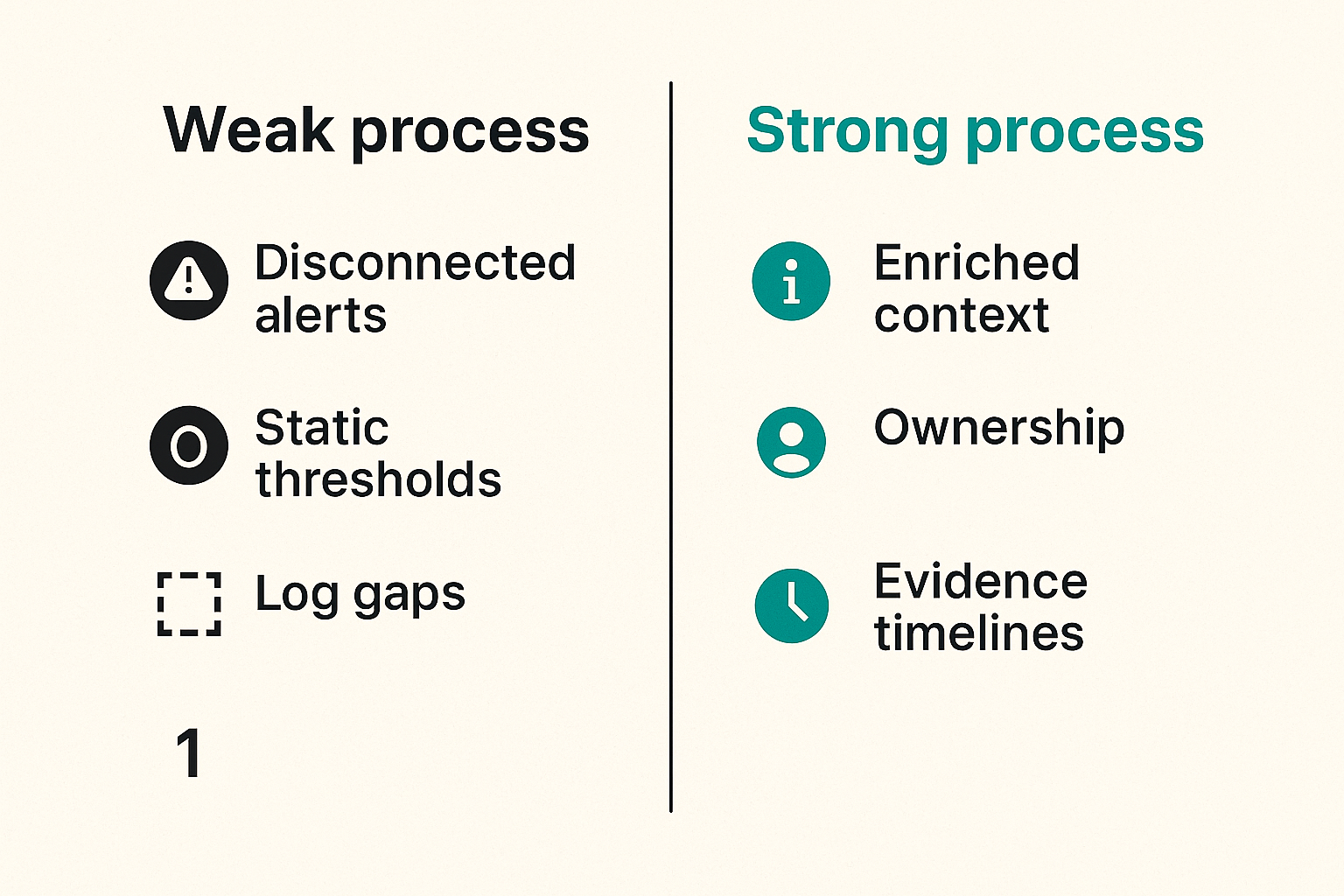
Bad peptide threat hunting does not fail loudly. It creates quiet operational drag. Analysts stop trusting alerts. Research teams stop responding quickly. Security leaders think they have coverage because dashboards are green.
False positives hide in normal science
Scientific work is bursty. A researcher may download a large dataset before a deadline. A team may share files with a new partner during a collaboration kickoff. A notebook may run at odd hours because a job was scheduled overnight. Static thresholds will punish normal work.
Common false-positive sources include:
- Conference, patent, or regulatory deadline bursts
- New vendor onboarding
- Project reorganizations and renamed folders
- Shared lab accounts with unclear ownership
- Automated pipelines that look like human bulk access
- Data science notebooks exporting intermediate artifacts
The fix is not to suppress everything. The fix is to add business context and create review paths. If a project deadline explains the burst, record that context. If a shared account causes ambiguity, fix the account model or add compensating telemetry.
Tool gaps create investigation dead ends
The worst moment in an investigation is discovering that the one system that can prove intent does not log the event, keeps logs for only a few days, or cannot export them without vendor support.
Typical dead ends:
- SaaS audit logs retained too briefly for insider timelines
- Vendor portals with limited API access to audit data
- Lab workstations without endpoint telemetry
- Cloud notebooks that log compute activity but not data lineage clearly
- File shares with path changes that break correlation
- Identity systems that do not map contractors cleanly to projects
A useful readiness exercise is to run a tabletop around one restricted peptide dataset. Ask how the SOC would prove who accessed it, where it moved, who approved the transfer, and whether it reached an external party. Missing evidence becomes an engineering backlog.
Practical rule: If an investigation depends on a log source, test access to that log source before the incident.
What works: operating rules for SOC teams
Peptide threat hunting works when the SOC treats it like an operating capability. That means clear owners, repeatable data, tuned detections, and response paths that do not break research operations.
Assign owners before alerts arrive
Every sensitive peptide project should have a security owner, a business owner, and a technical system owner. They do not need to attend every triage call, but they must be reachable when context matters.
Define ownership like this:
- Security owner: accountable for detection quality and investigation flow
- Research owner: validates whether activity matches expected science
- System owner: confirms logs, permissions, and technical behavior
- Legal or IP owner: advises when exposure thresholds are met
- Incident commander: coordinates response when the case escalates
This prevents the SOC from becoming a routing desk. Analysts can focus on evidence, not organizational archaeology.
Measure investigation friction, not dashboard volume
The metric that matters is not how many peptide alerts exist. It is how quickly analysts can move from signal to decision.
Track practical measures:
- Time to identify project sensitivity
- Time to confirm actor authorization
- Time to reconstruct data movement
- Time to reach a business owner
- Percent of cases with complete enrichment
- Percent of detections converted from validated hunts
- Number of investigation dead ends caused by missing telemetry
Dashboard volume can be misleading. A quiet dashboard may mean low risk, or it may mean no visibility. A busy dashboard may mean good coverage, or it may mean thresholds are lazy. Investigation friction tells you whether the system works.
Where automation helps and where it hurts
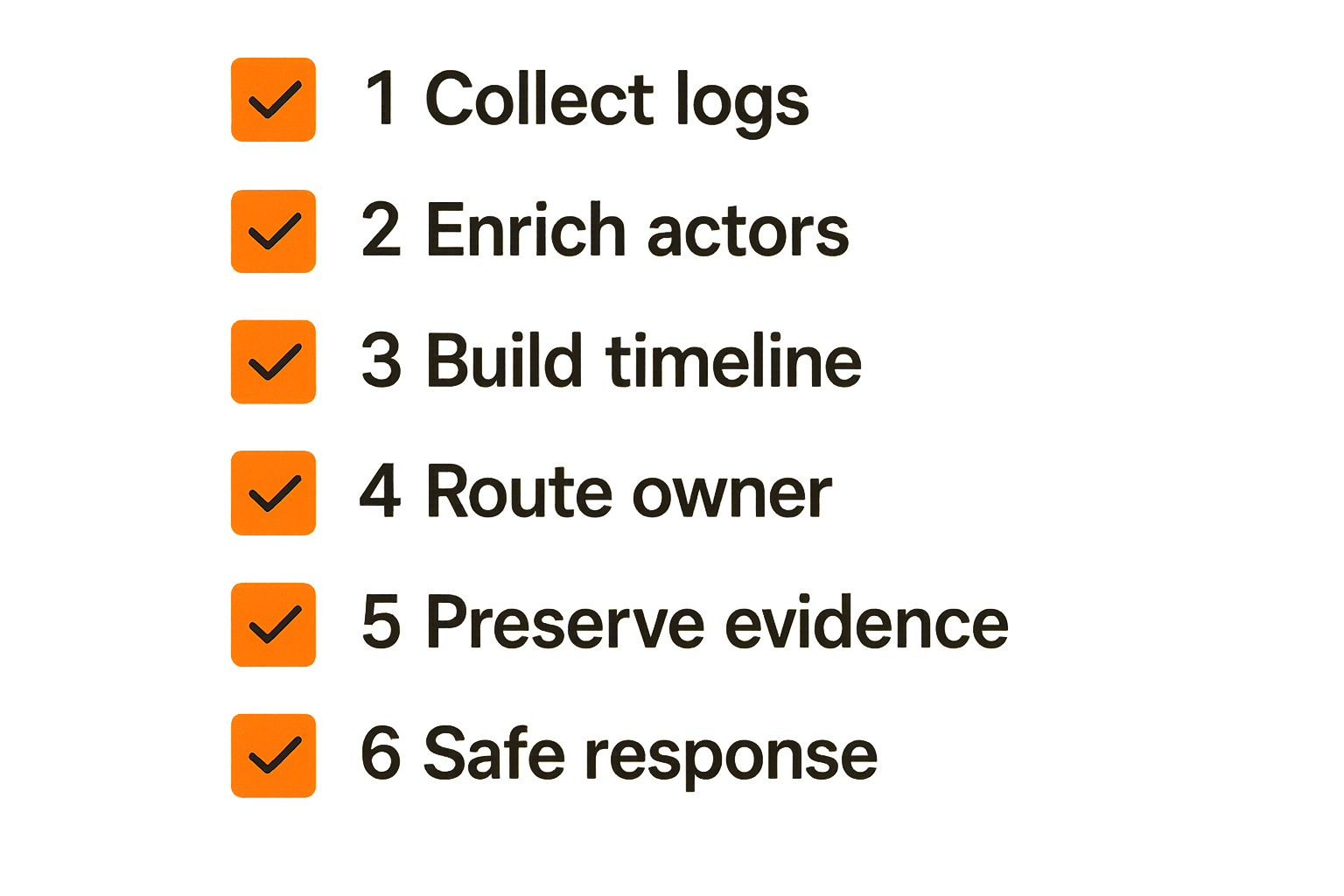
Automation is useful in peptide threat hunting, but only if it reduces analyst uncertainty. Automation that blocks first and asks questions later can disrupt research, damage experiments, or create political blowback that weakens the security program.
Automate collection, correlation, and case prep
Good automation handles repetitive work:
- Pull identity, storage, endpoint, and SaaS events into one case
- Enrich actors with project membership and contractor status
- Attach asset sensitivity and approved transfer paths
- Correlate recent related events across systems
- Create a timeline with links to raw evidence
- Notify the correct research or system owner
- Preserve evidence before retention windows expire
This is where automation pays off. It turns a vague alert into an investigation packet.
A practical case packet should answer:
- What sensitive asset was involved?
- Who touched it?
- Was the actor approved?
- Where did the data go?
- What changed before and after the event?
- Who can validate business context?
- What response options are safe?
Keep judgment in the human loop
Automated containment should be careful. Disabling a user account, locking a notebook workspace, or blocking a lab subnet may be appropriate in some cases. It may also halt critical research or interrupt an experiment that cannot be easily restarted.
Use tiered response:
| Confidence | Example condition | Suggested action |
|---|---|---|
| Low | Single unusual download by approved researcher | Enrich and review |
| Medium | External share involving restricted project and unknown domain | Open case and contact owner |
| High | Bulk export by departing user from unmanaged device | Preserve evidence and restrict sharing |
| Critical | Confirmed unauthorized transfer to external account | Escalate incident response and legal review |
The key is to automate decision support before automating punishment. Let machines gather context. Let trained responders decide when business interruption is justified.
Product fit: connecting peptide hunts to ThreatCrush workflows
Peptide threat hunting is a good test of a security operations platform because it exposes weak workflow design quickly. If a platform can only display alerts, it will struggle. If it can connect signals, owners, context, and response evidence, it becomes useful.
What a useful platform should connect
For this use case, the platform should help SOC teams connect:
- Threat intelligence about relevant actors, tactics, and targeting patterns
- Detection logic mapped to sensitive peptide workflows
- Identity and access context from the business
- Telemetry from SaaS, cloud, endpoint, network, and lab-adjacent systems
- Case management with timelines and evidence preservation
- Response playbooks that include research and legal owners
- Validation loops that turn hunts into maintained detections
This is not about buying a magic peptide security product. The practical question is whether your SOC can move from weak signal to confident decision without rebuilding context every time.
Closing the loop on peptide threat hunting
Peptide threat hunting should end with better operations, not just an interesting report. Each hunt should produce one or more durable outcomes:
- A validated visibility map
- A tuned detection
- A new enrichment source
- A corrected access control
- A response playbook update
- A documented business owner
- A telemetry backlog item
That changes the conversation with research and leadership. Security is no longer asking for abstract logging improvements. The SOC can show exactly which investigation step failed, what evidence was missing, and how that gap affects peptide IP protection.
The closing point is simple: peptide threat hunting is not a one-off exercise. It is a way to connect proactive hunting, detection engineering, incident response, and business context around assets that do not fit generic enterprise patterns.
Try threatcrush.com
ThreatCrush helps security teams connect signals, threat intelligence, detections, investigations, and response workflows without turning every hunt into a spreadsheet project. If peptide threat hunting is becoming part of your SOC roadmap, Try threatcrush.com.
Try ThreatCrush
Real-time threat intelligence, CTEM, and exposure management — built for security teams that move fast.
Get started →