Brinks Home Security in the SOC: Turning Physical Alarm Signals Into Detection Workflows
Brinks Home Security shows up in security conversations in a strange way. A facilities team has it. An executive home has it. A small lab, regional office, or temporary site has it. Then something happens at 2:13 a.m., and the SOC is expected to know whether a door alarm is a burglary, a maintenance mistake, an insider event, or noise.
Teams think the problem is Brinks Home Security as a product choice. The real problem is whether physical alarm signals can be trusted, routed, correlated, and acted on inside a digital security workflow.
That changes the conversation. A home alarm notification is not the same thing as an EDR detection, but it can still matter to incident response. A physical intrusion at the wrong location can change the severity of a credential alert, a VPN login, a lost device case, or an executive protection event.
The practical question is not whether the SOC should own home alarm monitoring. In most organizations, it should not. The practical question is how to consume physical security context without turning the SOC into a dispatch desk.
Table of contents
- Why Brinks Home Security becomes a SOC architecture issue
- Where Brinks Home Security fits in the detection stack
- Map the signal path before writing detections
- Build the workflow around trust and escalation
- What to monitor and what to ignore
- Implementation sequence for SOC integration
- What breaks when teams implement it badly
- Comparison: physical alarm feed vs security telemetry
- Metrics that prove the workflow is working
- Product fit: where ThreatCrush helps
- Closing: make Brinks Home Security operational
Why Brinks Home Security becomes a SOC architecture issue
A physical alarm system becomes a SOC problem when the event changes cyber risk. That is the line. If an alarm only requires local dispatch, facilities can handle it. If the same alarm affects laptop exposure, executive safety, insider risk, branch compromise, or evidence preservation, the SOC needs context.
The mistake teams make is building an integration because someone found an API, inbox, SMS forwarder, or monitoring portal export. Integration is not the hard part. The hard part is deciding what the SOC is allowed to infer from that signal.
The signal is physical but the response is digital
A door sensor, motion event, camera alert, panic alarm, or panel tamper event is not inherently a cyber incident. But it can be a trigger for digital actions:
- Suspend a privileged account until contact is made.
- Increase severity on a suspicious VPN login from the same region.
- Check whether a managed endpoint last seen at that location is online.
- Preserve relevant authentication, EDR, network, and cloud logs.
- Notify incident command if the affected location maps to a sensitive asset.
A useful way to think about it is this: physical alarms are enrichment until correlation makes them operational.
Practical rule: Do not page the SOC for every physical alarm. Page the SOC when a physical alarm intersects with a protected person, protected site, sensitive asset, or active cyber signal.
The mistake teams make is treating alarms as tickets
Forwarding alarm emails into a ticket queue looks responsible. In practice, it creates a dead inbox with weak context. Analysts see an alarm label, maybe a timestamp, and often no reliable way to answer the first question: does this matter to us right now?
What breaks in practice is ownership. Facilities thinks security is watching. Security thinks facilities confirmed. The monitoring provider may have called a contact list, but the SOC does not know whether the contact was current, whether police were dispatched, or whether the event was canceled.
If you cannot answer who owns confirmation, you do not have a workflow. You have notifications.
Where Brinks Home Security fits in the detection stack
Brinks Home Security should not be modeled as another SIEM source with the same trust assumptions as endpoint telemetry. It sits closer to external context, third-party signal, or business risk input. That does not make it useless. It means the SOC has to label it correctly.
In a mature workflow, physical alarm context is consumed by detection logic, case triage, and incident response. It is not treated as a universal source of truth.
Consumer monitoring is not enterprise telemetry
Many alarm systems are designed for homeowner notification, professional monitoring, and emergency dispatch. Enterprise SOCs are designed around evidence, correlation, auditability, and repeatable response. Those are different operating models.
A consumer-style alarm event may not provide:
- Stable event schemas.
- Rich API access.
- Analyst-friendly event IDs.
- Complete historical export.
- Strong identity binding for every action.
- Clear custody for video, sensor, or contact data.
That does not mean you cannot use the signal. It means you should avoid building high-confidence detections on low-context events.
Use it as context not ground truth
The right model is usually contextual correlation. The SOC does not decide that an intrusion occurred because an alarm fired. The SOC decides that a risk condition exists because an alarm fired near other signals.
Examples:
- Alarm at executive residence plus impossible-travel login attempt.
- Panel tamper at lab plus badge failure plus server room camera outage.
- Door alarm at remote office plus new unmanaged device on local network.
- Motion event after hours plus privileged account password reset.
If your team is already working on connected analysis, the same principles apply. We have covered this pattern in more depth in threat analysis workflows that actually work, especially the need to connect signals before asking analysts to make decisions.
Map the signal path before writing detections
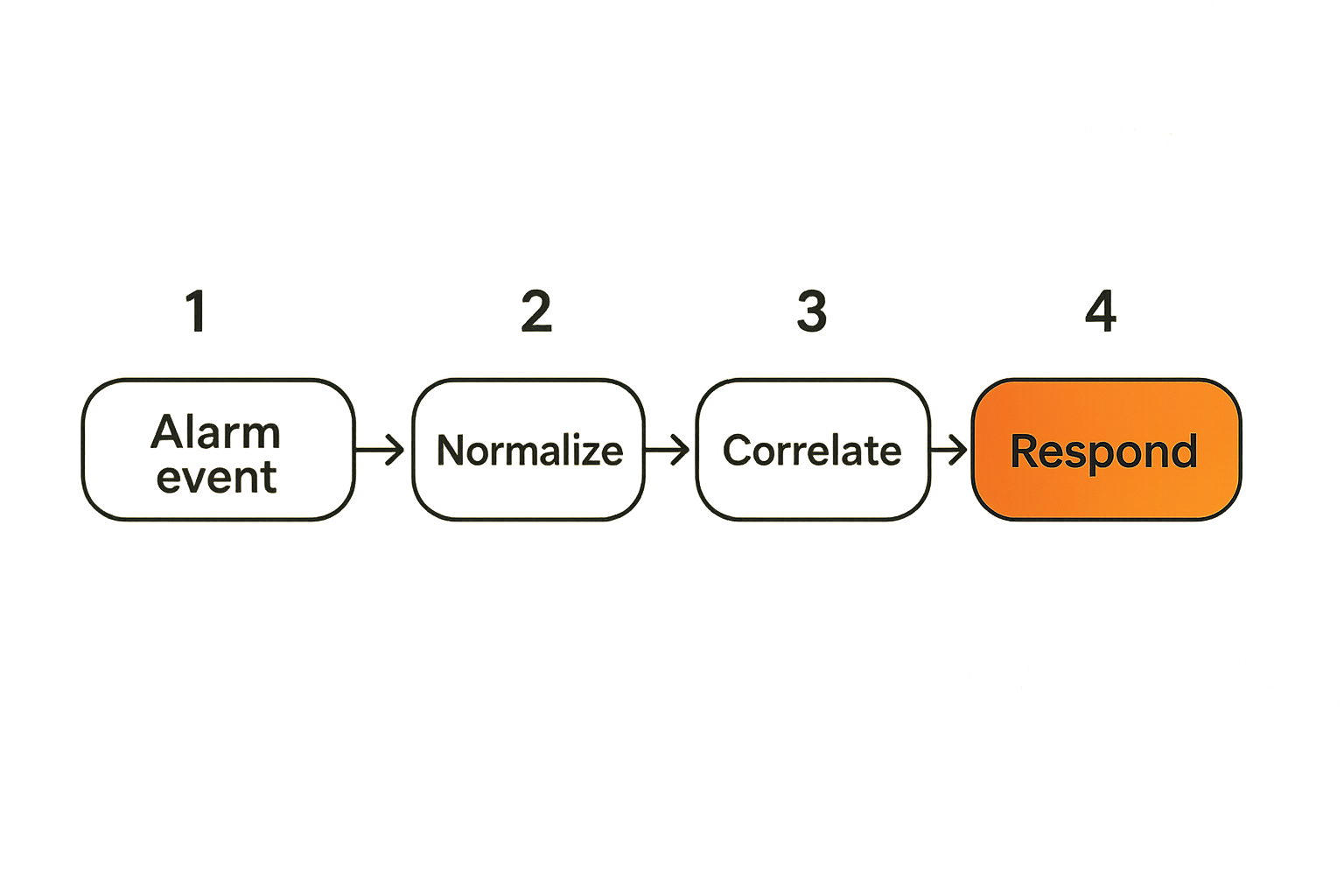
Before writing rules, draw the signal path. This sounds basic. It is where most broken implementations reveal themselves.
The path is not simply alarm to SIEM. It includes the device, panel, monitoring service, notification channel, integration point, normalization layer, case system, responder, and business owner. Every hop can alter meaning.
Identify event sources and ownership
Start with an inventory that separates locations, devices, accounts, and owners. Do not put them in one flat list.
You need to know:
- Which sites or residences are in scope.
- Which sensors exist at each site.
- Who owns the alarm account.
- Who receives primary monitoring calls.
- Which events are available digitally.
- Which events are only available through human confirmation.
- Which assets, people, or business processes map to that site.
A regional office with developer workstations has a different workflow than an executive residence. A storage room with spare laptops is different from a lab with customer data. The label home security hides very different risk profiles.
Related reading from our network: teams dealing with home and small-site infrastructure face similar inventory and network-boundary problems in computer systems technology for streaming, torrents, IPTV, and home media, even though the operational domain is different.
Normalize event states before routing
Alarm events often arrive with human-friendly labels. The SOC needs operational states. Create a small vocabulary and map provider-specific labels into it.
Example normalized states:
- armed
- disarmed
- alarm_triggered
- alarm_canceled
- dispatch_requested
- dispatch_canceled
- panel_tamper
- sensor_fault
- communication_loss
- contact_confirmed
- contact_unreachable
Then attach metadata:
- location_id
- location_type
- asset_sensitivity
- protected_person
- business_owner
- event_source
- confidence
- confirmation_status
- response_owner
This is not bureaucracy. It is how you prevent a motion alert, canceled alarm, and confirmed forced entry from looking identical in the queue.
Build the workflow around trust and escalation
The most useful physical security workflow is conservative by default and decisive when correlation is strong. It should avoid two failures: ignoring meaningful physical context, and overreacting to every alarm.
Trust is not binary. Trust is a field in the case. It changes as new evidence arrives.
Separate notification acknowledgement from incident confirmation
Acknowledgement means someone saw the alert. Confirmation means the organization has enough evidence to take an incident action. Those are not the same.
For example:
- Monitoring notification arrives.
- Facilities acknowledges receipt.
- Primary contact confirms whether the alarm was expected.
- SOC checks for related cyber signals.
- Incident commander decides whether to escalate.
If step two is treated as step five, you will either under-respond or over-respond.
Practical rule: An alarm notification can start a case, but it should not confirm an incident by itself unless your policy explicitly says that event type is sufficient.
Put humans in the loop at the right boundary
Automation can enrich, correlate, suppress, and route. Humans should confirm ambiguous physical reality and approve high-impact containment actions.
Good human-in-the-loop boundaries include:
- Calling a site owner before locking accounts.
- Asking executive protection before escalating residence alarms.
- Requiring incident command approval before broad remote wipe actions.
- Confirming whether maintenance, cleaning, or contractors were scheduled.
Related reading from our network: the coordination model in AI content asks and offers for local networks is a useful adjacent example of intake, routing, verification, and follow-up. SOC workflows have different stakes, but the trust pattern is familiar.
What to monitor and what to ignore
A SOC cannot treat every alarm as equal. It needs a small set of physical event patterns that actually change cyber response. Everything else should remain with facilities, monitoring contacts, or local security.
The practical question is: what event would change analyst behavior?
High-value alarm patterns
Useful patterns tend to involve timing, sensitivity, and correlation.
Monitor these closely:
- After-hours alarm at a location containing managed endpoints, network gear, backups, prototypes, regulated data, or executive material.
- Panel tamper or communication loss at a sensitive site.
- Repeated alarms at the same site during an active account compromise.
- Alarm at a location associated with a targeted executive or administrator.
- Alarm at a temporary office, event space, or acquisition site with weak local controls.
- Alarm plus endpoint going offline unexpectedly.
- Alarm plus badge access failure, camera outage, or network sensor outage.
These are not all incidents. They are good reasons to correlate quickly.
Noise patterns that should not page the SOC
Most physical alarm noise should not reach an analyst as an interrupt.
Usually suppress or route elsewhere:
- User-canceled alarms with trusted confirmation.
- Scheduled maintenance windows.
- Low-battery and sensor fault events unless repeated at sensitive sites.
- Expected disarm events by authorized contacts.
- Single motion alerts in low-sensitivity locations with no related cyber signal.
- Duplicate provider notifications for the same event.
The mistake teams make is using urgency from the alarm world as urgency for the SOC. A loud siren is not automatically a high-severity cyber event.
Implementation sequence for SOC integration
Integration should be staged. If you start with automation, you will automate confusion. Start with scope, vocabulary, and ownership. Then add routing. Then add correlation. Only then add containment.
A workable sequence looks like this:
- Define in-scope locations and people.
- Assign a business owner and response owner for each location.
- Map physical events into normalized states.
- Define severity rules based on location sensitivity.
- Add enrichment from asset inventory, identity, EDR, VPN, cloud, and network logs.
- Route low-confidence events to facilities or physical security.
- Route correlated events to SOC triage.
- Create response playbooks for the few scenarios that matter.
- Test with tabletop exercises and synthetic events.
- Review false escalations monthly and tune.
Practical rule: Build the first version to produce better decisions, not more alerts. If analysts cannot explain why a physical event reached them, the routing logic is not ready.
Start with inventory and data contracts
A data contract is a simple agreement about fields, meanings, and ownership. It matters because alarm labels are often not enough.
At minimum, define:
| Field | Why it matters | Example |
|---|---|---|
| location_id | Stable join key for correlation | site_exec_014 |
| location_type | Determines default routing | executive_residence |
| sensitivity | Drives severity | high |
| event_state | Normalized alarm state | panel_tamper |
| confirmation_status | Prevents premature escalation | contact_unreachable |
| response_owner | Avoids ownership gaps | physical_security |
| cyber_correlation | Shows related digital evidence | vpn_anomaly_found |
This does not require a massive platform project. It requires discipline. Even a small integration becomes maintainable when the fields are stable.
Add correlation before automation
Automation is attractive because physical alarms feel time-sensitive. But correlation should come first.
Useful correlation joins include:
- location to asset inventory
- location to assigned users
- location to executive profile
- location to network ranges
- location to cloud admin activity
- location to recent alerts
- location to open incidents
If you are building this alongside application or pipeline signals, ownership becomes even more important. The same issue appears in DevSecOps and application security workflows: the SOC cannot scale when every adjacent team throws raw signals over the wall.
Related reading from our network: the supply-chain framing in Trane Supply as a CI/CD supply chain security problem is a useful analogy. The point is not the vendor name; it is mapping changes, ownership, and gates before alerts become noise.
What breaks when teams implement it badly
Most failures are not technical. They are workflow failures disguised as integration problems.
A webhook can deliver the event. A SIEM parser can normalize it. A SOAR playbook can open a case. None of that answers whether the event should change response.
Alert fatigue from physical events
Physical alarm feeds can produce repetitive, low-context events. If those hit the SOC directly, analysts learn to ignore them. Once that happens, the rare meaningful event is also ignored.
Common fatigue patterns:
- Every open, close, arm, and disarm event becomes searchable noise.
- Duplicate alerts create multiple cases for one alarm.
- Canceled alarms remain unresolved in the SOC queue.
- Low-sensitivity sites generate the same priority as sensitive sites.
- No one closes the loop after facilities confirms a benign cause.
What works is tiered routing. Low-value events go to logs or facilities. Medium-value events become enrichment. High-value correlated events become cases.
Custody and privacy mistakes
Physical security data can include sensitive personal information. Executive residences, employee homes, camera footage, contact numbers, and family schedules are not ordinary telemetry.
Bad implementations over-collect. They copy everything into the SIEM because it is easy. Then retention, access, discovery, and insider exposure become problems.
Better implementations minimize data:
- Store normalized event states instead of full personal details where possible.
- Limit access to residence or protected-person mappings.
- Keep video systems separate unless a response policy requires retrieval.
- Use case references instead of broad data replication.
- Define retention by event type and sensitivity.
The SOC needs enough context to act. It does not need to become a permanent archive of every household event.
Comparison: physical alarm feed vs security telemetry
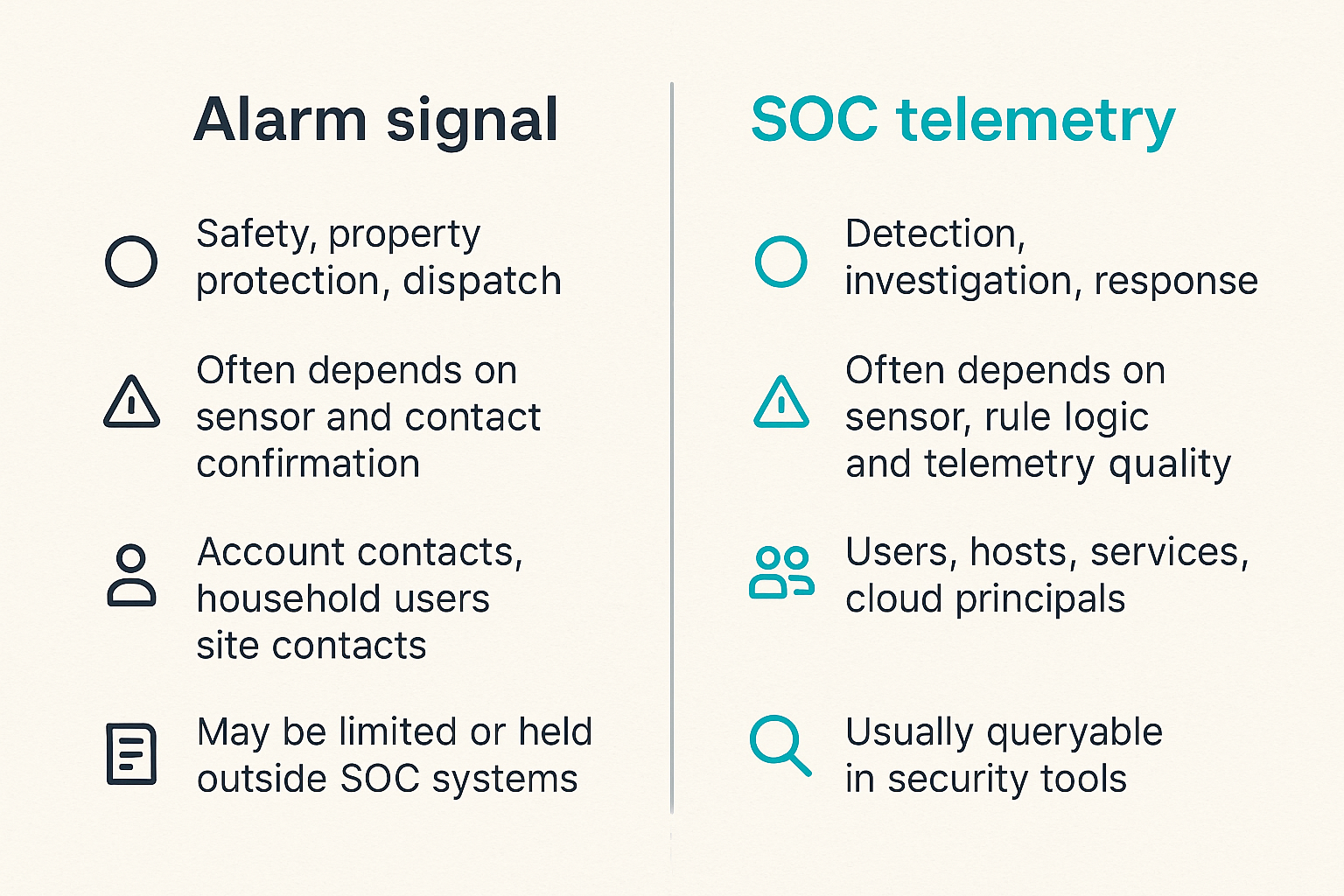
Brinks Home Security events and SOC telemetry may use similar words: alert, alarm, event, dispatch, confirmation. The guarantees behind those words are different. If the team does not document the difference, analysts will invent their own assumptions.
Similar words different guarantees
Here is the practical comparison:
| Dimension | Physical alarm signal | Typical SOC telemetry |
|---|---|---|
| Primary purpose | Safety, property protection, dispatch | Detection, investigation, response |
| Event confidence | Often depends on sensor and contact confirmation | Often depends on sensor, rule logic, and telemetry quality |
| Identity model | Account contacts, household users, site contacts | Users, hosts, services, cloud principals |
| Evidence detail | May be limited or held outside SOC systems | Usually queryable in security tools |
| Response owner | Monitoring provider, facilities, physical security | SOC, IR, IT, cloud, app owners |
| Retention needs | Privacy-sensitive and policy-dependent | Investigation and compliance dependent |
| Automation risk | High if physical context is unconfirmed | High if detection confidence is weak |
The point is not that one is better. The point is that they answer different questions.
How to document confidence
Give analysts confidence labels that mean something. Avoid vague labels like low, medium, high unless the playbook defines them.
Better examples:
- unconfirmed_sensor_event: alarm fired, no trusted human confirmation yet
- user_canceled_confirmed: known contact canceled and no cyber correlation exists
- dispatch_requested_unconfirmed: monitoring action occurred, but SOC lacks confirmation
- physical_event_correlated: alarm plus related cyber signal within defined window
- confirmed_physical_incident: response owner confirmed physical intrusion or tampering
These labels make automation safer. A playbook can treat physical_event_correlated differently from unconfirmed_sensor_event.
Metrics that prove the workflow is working
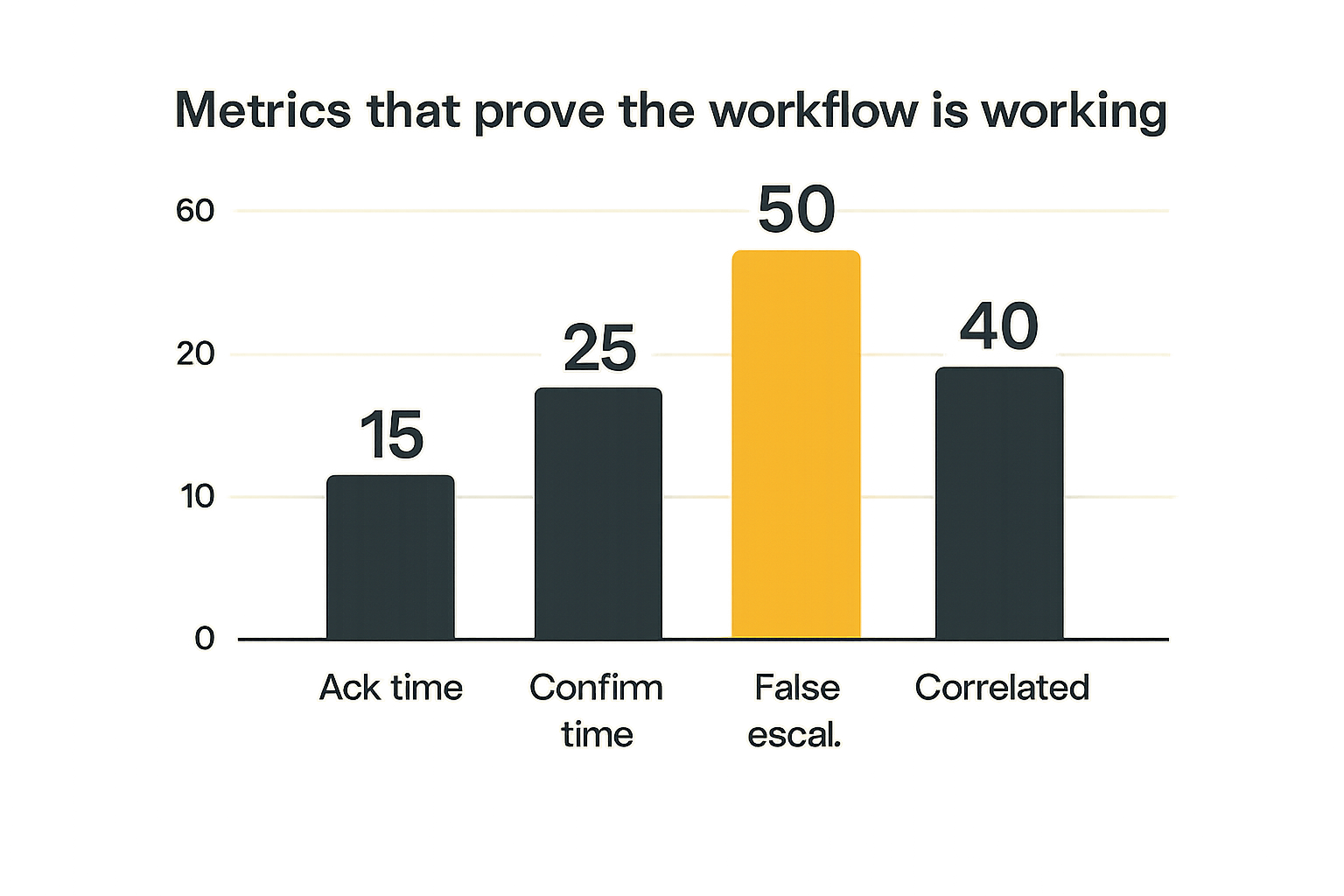
Do not measure success by how many alarm events you ingest. Ingest volume is not a security outcome. Measure whether the workflow helps the organization make faster, better decisions when physical context matters.
The practical question is: did the signal reduce uncertainty?
Measure decision time not raw alarm count
Useful metrics include:
- Time from alarm receipt to owner acknowledgement.
- Time from alarm receipt to confirmation status.
- Time from correlated event to SOC case decision.
- Percentage of physical events correlated with cyber signals.
- Percentage of SOC escalations later marked false escalation.
- Number of cases where physical context changed severity.
- Number of cases where missing ownership delayed response.
A good workflow may reduce SOC-visible alarm count. That is not a failure. It means routing improved.
Track false escalation causes
False escalation is not just a false positive. It is a process defect. Categorize why it happened.
Common causes:
- stale contact list
- missing maintenance window
- duplicate provider notification
- ambiguous event label
- wrong location sensitivity
- no asset mapping
- no confirmation handoff
- overly broad correlation window
Review these monthly. The goal is not perfection. The goal is to remove predictable waste before analysts build bad habits.
Product fit: where ThreatCrush helps
A physical alarm workflow does not need another isolated dashboard. It needs context: what assets matter, what external threats are active, what vulnerabilities are being exploited, and which signals should change response.
That is where ThreatCrush fits architecturally. ThreatCrush is built for security operations professionals building and scaling SOC capabilities, especially teams trying to connect threat intelligence, exposure, detection, and response instead of running them as disconnected tools.
Connect external risk to internal response
Physical context becomes more useful when the SOC can answer related questions quickly:
- Is this location tied to a known targeted executive or administrator?
- Are there active threats against our sector, region, or brand?
- Are exposed assets mapped to this site or user group?
- Are vulnerability or attack-surface findings already raising risk?
- Are related indicators appearing in endpoint, network, or cloud telemetry?
The alarm is rarely the whole story. It is one signal in a larger operational picture.
Keep the workflow inspectable
The worst security workflow is one no one can explain after it fires. Teams need inspectable routing, enrichment, confidence labels, and response history.
For Brinks Home Security and similar physical alarm sources, that means the SOC should be able to reconstruct:
- what event arrived
- how it was normalized
- what asset or person it mapped to
- what cyber signals were correlated
- who acknowledged it
- who confirmed it
- why the case was escalated or suppressed
This is not about hype. It is about making cross-domain security signals usable under pressure.
Closing: make Brinks Home Security operational
Brinks Home Security can be relevant to the SOC, but only when the team treats it as an architecture and workflow problem. If the implementation is just notification forwarding, it will create noise. If the implementation connects location, ownership, confirmation, and cyber correlation, it can reduce uncertainty during real incidents.
The SOC does not need to own every door sensor. It needs to know when a physical event changes cyber risk.
The practical takeaway
Start small. Pick the sensitive locations or protected people where physical alarm context genuinely changes response. Normalize a few event states. Define confirmation ownership. Correlate with identity, endpoint, network, cloud, and asset data. Measure decision time and false escalation causes.
That changes the conversation from should we monitor this alarm to what decision should this signal support.
Next step
If your team is evaluating Brinks Home Security in a SOC workflow, do not begin with ingestion. Begin with the response question. Decide what the SOC should do differently when the alarm fires, then build the data path to support that decision.
Try threatcrush.com
ThreatCrush helps security operations professionals connect threat intelligence, exposure, detection, and response workflows without turning every new signal into another disconnected queue. Try threatcrush.com.
Try ThreatCrush
Real-time threat intelligence, CTEM, and exposure management — built for security teams that move fast.
Get started →