Answer Engine Optimization Threat Hunting: A SOC Workflow for AI-Cited Attack Surface

Answer engine optimization threat hunting sounds like a marketing problem until an AI answer engine summarizes your product, your docs, your pricing logic, or your security posture in a way your SOC has never seen.
Teams think the problem is ranking in AI answers. The real problem is that AI crawlers, retrieval systems, and answer engines are becoming another discovery layer over your public attack surface. They read pages, cache facts, follow links, infer relationships, and sometimes expose operational context faster than your internal teams can validate it.
That changes the conversation. This is not about stuffing pages for a chatbot. For security operations, answer engine optimization threat hunting is an architecture and workflow problem: what content can be discovered, what claims can be repeated, what crawler behavior should be monitored, and who owns response when an answer engine creates risk.
The practical question is simple: if AI systems are now part of how attackers, customers, journalists, analysts, and partners learn about your organization, can your SOC see that layer, reason about it, and act before it becomes an incident?
Table of contents
- Why answer engines changed the threat hunting surface
- What answer engine optimization threat hunting actually means
- Map the AI discovery surface before you hunt
- Signals your SOC should collect
- Build the detection workflow
- What works and what fails in practice
- Common failure modes
- Use cases for security teams
- Metrics that make the program measurable
- Where ThreatCrush fits
- Closing make answer engine optimization threat hunting operational
Why answer engines changed the threat hunting surface
The discovery layer moved upstream
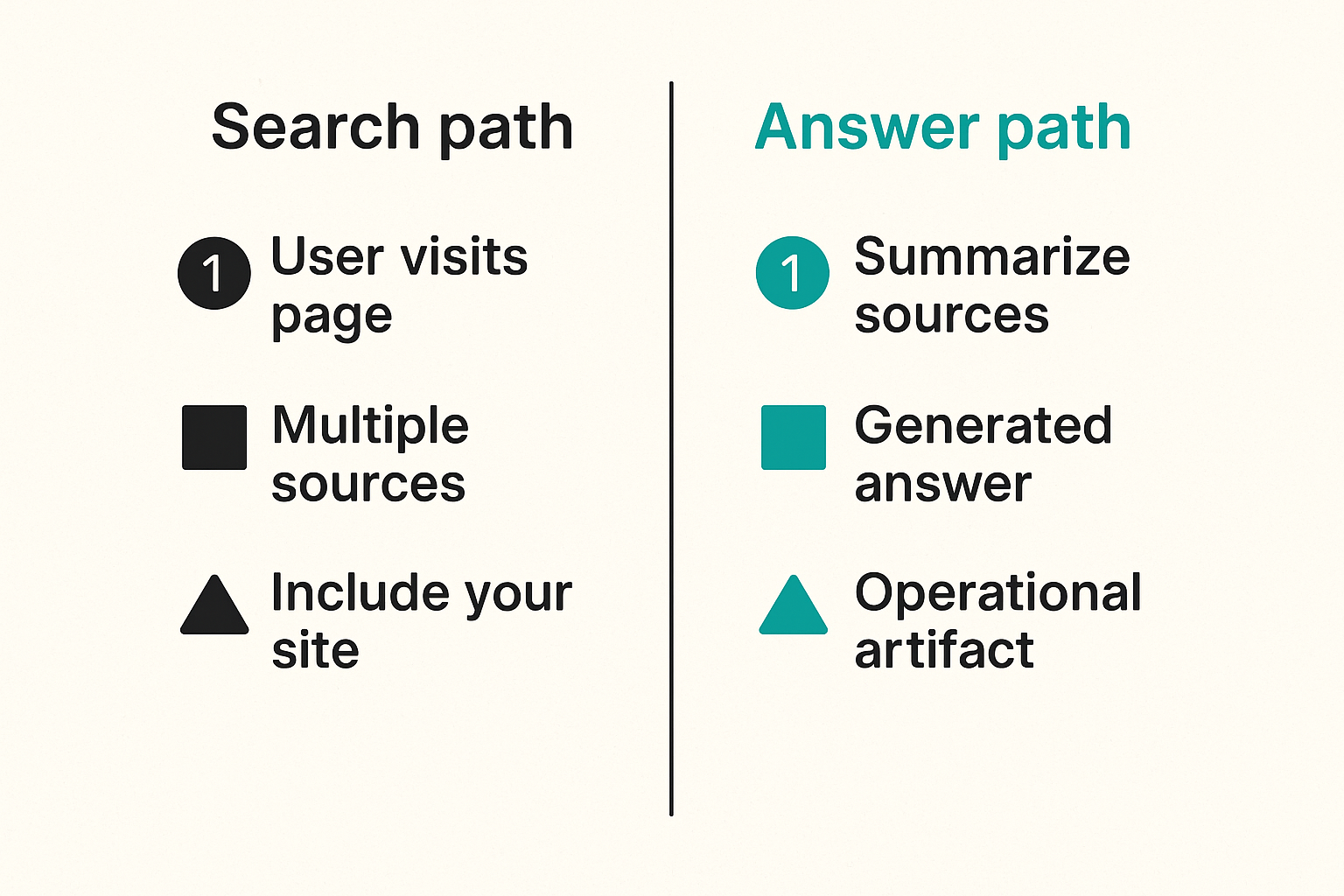
Search used to send people to your pages. Answer engines often summarize your pages before anyone clicks. They combine your site, third-party pages, documentation mirrors, forums, social posts, partner pages, package registries, and cached snippets into a synthesized answer.
That matters because the answer itself becomes an operational artifact. It can recommend a login path, describe an integration pattern, summarize a security policy, name a support channel, list exposed endpoints, or repeat an outdated mitigation. If the answer is wrong, stale, or attacker-influenced, users may still act on it.
For a SOC, the surface is not only your web server logs. It includes the chain from crawler access to retrieval to generated answer to user action. You will not see every step. But you can instrument enough of the workflow to detect abnormal discovery, risky content exposure, and answer drift.
The mistake teams make is treating AI visibility as brand work only
Marketing teams naturally care about whether answer engines cite the company correctly. Security teams should care about what those systems can infer and repeat.
The mistake teams make is splitting the problem too cleanly. Marketing owns AI citations. Web owns robots rules. Legal owns disclaimers. Security owns incidents. Nobody owns the connective tissue.
A useful way to think about it is this: AI visibility creates a public knowledge graph about your organization. If that graph contains incorrect trust paths, leaked implementation details, or spoofable support instructions, it becomes useful to attackers.
What the SOC should care about
The SOC does not need to become an SEO department. It does need to answer security questions:
- Which AI and search crawlers are accessing sensitive public assets?
- Which pages create operational risk if summarized without context?
- Which answers mention login, payment, support, API, incident response, security claims, or compliance controls?
- Which answer changes correlate with site changes, third-party posts, or suspicious crawl behavior?
- Who can correct content and verify the correction propagated?
Practical rule: if an AI-generated answer can change a user action, an attacker decision, or a support workflow, treat it as security-relevant evidence.
What answer engine optimization threat hunting actually means
It is not classic SEO with a new label
Classic SEO optimizes pages for search visibility. Answer engine optimization focuses on whether answer systems can discover, understand, cite, and summarize content accurately. That is already more operational than metadata and keywords.
Answer engine optimization threat hunting adds a security lens. It asks where AI discovery creates exploitable ambiguity. It looks for risky answers, suspicious crawler behavior, poisoned sources, stale facts, impersonation paths, and public content that helps reconnaissance.
This guest post is written by the team at crawlproof.com, where the focus is helping site owners and operators understand how AI crawlers and answer engines discover, interpret, and cite public content.
It is a control loop
The work is not one scan. It is a loop:
- Map what answer engines can reach.
- Measure how crawlers behave.
- Query answer engines for sensitive scenarios.
- Compare answers against approved source-of-truth content.
- Triage drift, exposure, or manipulation.
- Remediate content, access, or detection gaps.
- Validate that the answer layer changed.
That is closer to continuous threat exposure management than to a campaign. The asset is public knowledge. The risk is operational misinterpretation or attacker leverage. The control is visibility plus correction.
The operating model
The best programs define three lanes:
- Content ownership: who can fix docs, landing pages, support pages, and security statements.
- Detection ownership: who watches crawler anomalies, answer drift, and suspicious source influence.
- Response ownership: who handles urgent corrections, takedowns, blocking, or customer comms.
What breaks in practice is unclear ownership. The SOC detects a risky AI answer, web analytics shows crawler activity, marketing says the page is accurate, legal wants review, and support keeps receiving tickets. Without an operating model, the finding becomes a meeting instead of a fix.
Map the AI discovery surface before you hunt
Inventory content that answer engines can consume
Start with the assets most likely to be crawled and cited:
- Public documentation
- Developer portals
- API references
- Login and onboarding pages
- Support articles
- Security and compliance pages
- Blog posts and release notes
- Status pages
- Marketplace listings
- Public GitHub repositories
- Community forum answers
- Partner implementation guides
Do not stop at your primary domain. Answer engines can pull from subdomains, docs platforms, static mirrors, package registries, cached pages, and third-party explainers. In production, the stale third-party guide is often more dangerous than the official page because it looks helpful and nobody owns it.
Classify content by operational sensitivity
Not all public content carries the same risk. A pricing page and a password reset article need different monitoring.
A practical classification model:
- Low sensitivity: generic brand, hiring, event, and top-of-funnel pages.
- Medium sensitivity: product architecture, integrations, data flow, and admin workflows.
- High sensitivity: authentication, payment, support escalation, API keys, security controls, incident contact paths, customer data handling, and compliance claims.
High sensitivity does not mean secret. It means misuse creates operational impact.
Practical rule: classify public content by what can go wrong if it is summarized incorrectly, not by whether the page is supposed to be public.
Track crawler paths and retrieval entry points
Crawler monitoring should include known AI crawlers, search bots, headless browsers, unusual user agents, and traffic patterns that behave like large-scale retrieval. Do not rely only on user-agent strings. They are useful labels, not identity proof.
Signals worth collecting:
- User agent, ASN, IP range, reverse DNS, and TLS fingerprint where available
- Crawl rate by path and content class
- Requests to old URLs, hidden docs, parameterized pages, and archived assets
- Robots.txt access followed by ignored disallow patterns
- Spikes after releases, incidents, funding news, or vulnerability disclosure
- Correlation between crawler visits and answer changes
This is not about blocking every crawler. Blocking everything can damage legitimate visibility and create false confidence. The point is to know what is being consumed and when behavior changes.
Signals your SOC should collect
Crawler behavior signals
A good signal is specific enough to investigate. Bad signal design creates noise: every crawler is suspicious, every docs request opens a ticket, and the SOC tunes it out within a week.
Useful crawler detections include:
- Known AI crawler requests to high-sensitivity content outside expected cadence
- Unknown automated clients requesting security, admin, or API docs at high rate
- Sequential crawling of deprecated docs or old release notes
- Requests that combine docs scraping with login probing from nearby infrastructure
- Repeated access to pages blocked by robots rules
- Crawlers pulling files that should not be discoverable from public navigation
The best detections combine behavior plus context. A crawler hitting a blog post is normal. A crawler hitting password reset docs, API auth examples, and customer escalation paths within minutes may deserve a look.
Content change signals
Answer drift often starts with content drift. Security teams should know when sensitive public pages change.
Track:
- New or modified pages in high-sensitivity categories
- Removed warnings, caveats, or support contact instructions
- New diagrams, screenshots, command examples, or API snippets
- Newly indexed staging or preview pages
- Third-party pages that outrank or contradict official guidance
- Release notes that mention security architecture, dependencies, or mitigations
This does not require the SOC to approve every content update. It requires a review path when a change alters trust, access, or support behavior.
Answer drift signals
Answer drift is the gap between an approved source of truth and what an answer engine says. It can be benign, stale, or dangerous.
Examples:
- An answer recommends an old support email that attackers spoof.
- An answer describes SSO as optional when enforcement changed.
- An answer says a deprecated API version is supported.
- An answer cites a third-party blog instead of official security guidance.
- An answer summarizes a mitigation but omits the condition that makes it safe.
You will not monitor every possible prompt. Start with prompt families tied to risk: login, reset, support, API keys, payments, security posture, breach response, compliance, and admin workflows.
Build the detection workflow
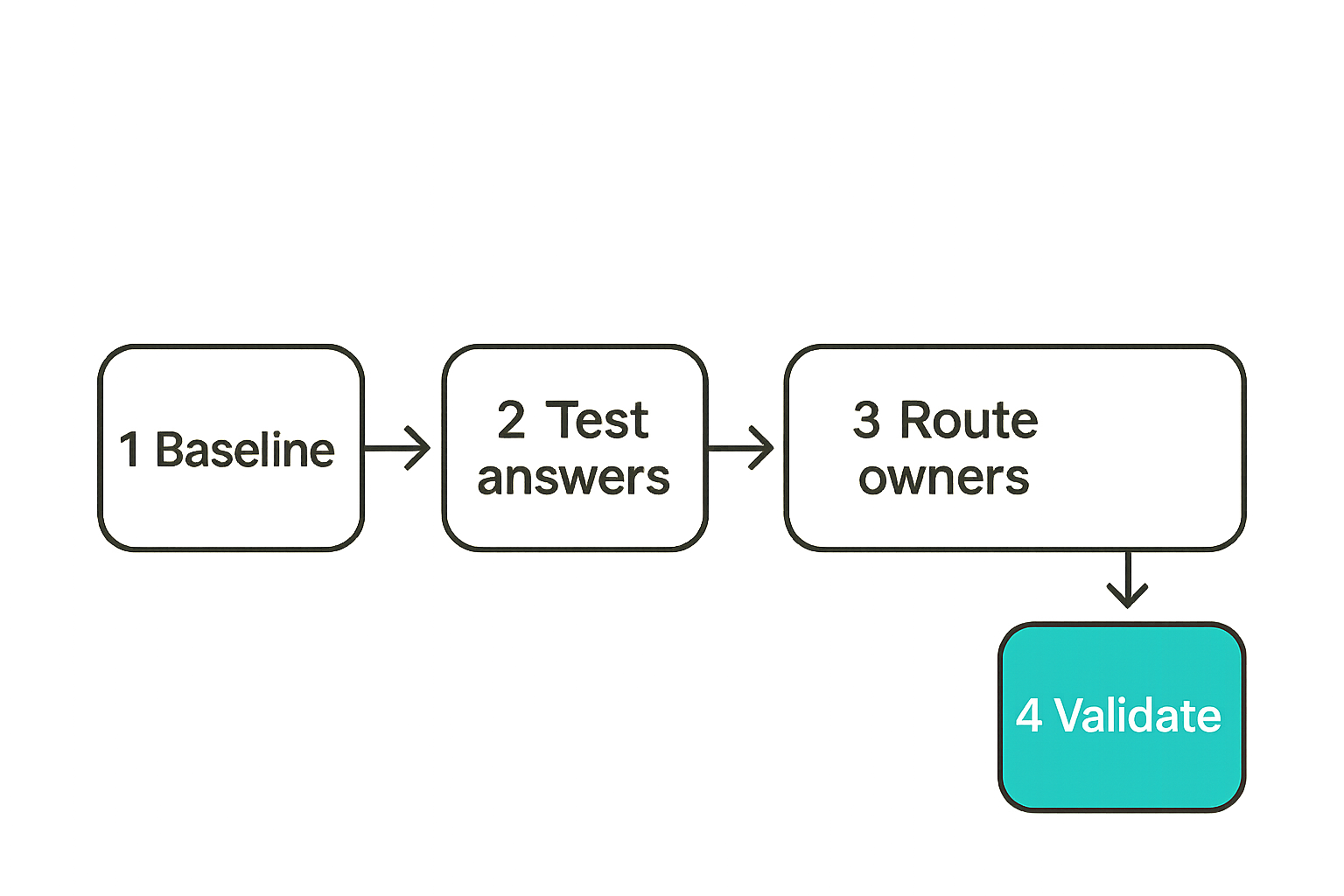
Step 1 baseline expected crawler behavior
Before writing alerts, build a baseline for each content class. Expected behavior for a homepage is not expected behavior for API authentication docs.
A simple baseline includes:
- Known crawler identities and normal request volume.
- Normal paths by content class.
- Expected crawl windows after publishing.
- Known referrers and source networks.
- Existing robots and sitemap rules.
- Historical anomalies that were benign.
This baseline prevents the program from becoming crawler panic. Many teams see an AI user agent and jump straight to blocking. Sometimes that is right. Often the better move is rate limiting, segmentation, more explicit source content, or monitoring.
Step 2 define risky answer scenarios
Write the scenarios as user or attacker questions. Keep them concrete.
Examples:
- How do I reset an admin password for Company X?
- What support number should I call for Company X billing?
- Does Company X support SAML enforcement?
- How do I generate API keys for Company X?
- What data does Company X collect from customers?
- Has Company X had a security incident?
- What domains does Company X use for login?
For each scenario, define the approved answer, approved citations, unacceptable answers, and severity. This gives analysts a way to triage without arguing about tone.
Step 3 route findings to owners
A finding without an owner is not a finding. It is trivia.
Routing should be based on the fix path:
- Wrong official content: docs, marketing, product, or security owner.
- Stale indexed content: web platform or SEO operations.
- Suspicious third-party source: legal, trust and safety, partner team, or comms.
- Impersonation or malicious guidance: incident response and abuse handling.
- Crawler abuse: security engineering, network controls, or WAF owner.
- Detection gap: SOC engineering or detection engineering.
Include evidence: prompt, answer, timestamp, cited sources, screenshots where allowed, affected user journey, and suggested correction.
Step 4 validate fixes like security controls
The fix is not complete when a page is edited. It is complete when the risky answer no longer appears, the crawler behavior is understood, and the owner confirms the source of truth.
Validation can include:
- Re-query the same answer scenarios after content changes.
- Check whether official pages are accessible, structured, and unambiguous.
- Confirm stale pages redirect or return appropriate status codes.
- Monitor crawler revisits to corrected pages.
- Watch support tickets or user reports for residual confusion.
- Close the finding only after evidence changes.
Practical rule: treat AI answer remediation like detection tuning. A change is not done until the signal improves and the false path is no longer reproducible.
What works and what fails in practice
What works
The programs that work are boring in the right way. They make AI discovery observable, assign ownership, and test real scenarios repeatedly.
What works:
- A small set of high-risk prompt families.
- Approved source-of-truth pages for sensitive workflows.
- Crawler telemetry joined with content classification.
- Detection logic that combines crawler behavior, content risk, and answer drift.
- Clear routing to web, docs, security, legal, support, and comms.
- Retesting after fixes.
The practical question is not whether answer engines are perfect. They are not. The question is whether your organization can detect and correct the failure modes that matter.
What fails
What fails is treating the issue as a one-time visibility report or a content formatting exercise.
Common weak approaches:
- Chasing every AI citation without risk ranking.
- Blocking crawlers with no monitoring plan.
- Writing content only for answer engines and not for users.
- Ignoring third-party pages because they are outside your CMS.
- Creating SOC alerts that fire on every bot request.
- Assuming robots rules equal enforcement.
- Leaving support teams out of response planning.
The mistake teams make is optimizing for visibility while ignoring state. What was crawled? What changed? What answer was produced? Who acted on it? Who fixed it?
Comparison table
| Approach | What it optimizes | What breaks in practice | Better operating model |
|---|---|---|---|
| SEO-only answer optimization | Citations and visibility | Risky answers look successful if they mention the brand | Add security review for sensitive answer scenarios |
| Block-all crawler policy | Short-term access reduction | Legitimate discovery disappears and shadow scraping continues | Monitor, classify, rate limit, and block selectively |
| SOC-only monitoring | Alerts and tickets | Analysts cannot fix content or third-party sources | Route findings to content and trust owners |
| Content-only governance | Page accuracy | No visibility into crawler behavior or answer drift | Join content inventory with telemetry |
| Manual ad hoc checks | Quick spot checks | No trend, no ownership, no validation | Scheduled testing and evidence capture |
A useful way to think about it is control coverage. You need content controls, access controls, detection controls, and response controls. Missing any one of those creates blind spots.
Common failure modes
Failure mode 1 blind crawler allowlists
Many teams allow known crawlers because they look legitimate. That is reasonable at small scale, but it becomes risky when allowlists are not tied to content class.
A known crawler reading generic marketing pages is low concern. The same crawler reading old incident writeups, hidden onboarding docs, or unsupported API examples may matter. The SOC should not treat all crawler traffic equally.
Better pattern:
- Allow known crawlers for low-risk public content.
- Monitor and rate limit sensitive content paths.
- Require explicit owner review for high-sensitivity pages.
- Alert on unexpected crawler access to deprecated or unlinked assets.
- Keep a deny path for abusive behavior regardless of label.
Failure mode 2 unowned public documentation
Documentation often grows faster than ownership. Engineers write it, product updates it, support links to it, marketing republishes pieces, and partners copy it.
What breaks in practice is stale trust guidance. A deprecated API key flow remains in an old guide. A partner page references an old login domain. A community answer says to contact a support mailbox that no longer exists. An answer engine repeats the stale source because it is clear and crawlable.
The fix is not to hide documentation. The fix is lifecycle management:
- Assign owners to sensitive docs.
- Expire or redirect obsolete guidance.
- Put canonical source links on copied content.
- Remove unsupported examples.
- Include security caveats near the action, not at the bottom.
Failure mode 3 no incident path for answer drift
Answer drift feels awkward because it is not always an incident. Sometimes it is wrong but low impact. Sometimes it directly enables fraud or account takeover.
Create severity rules before the first crisis:
- Low: minor product detail wrong, no trust or access impact.
- Medium: outdated workflow that may create support load or user confusion.
- High: wrong login, payment, support, API key, security, or compliance guidance.
- Critical: malicious impersonation, active phishing path, false breach claims, or guidance that exposes customer data.
For high and critical cases, response should look like incident handling: evidence capture, owner assignment, containment, correction, stakeholder comms, validation, and post-incident review.
Use cases for security teams
Brand impersonation and fake support flows
Attackers do not need to compromise your site if they can influence where users go for help. Fake support numbers, cloned login pages, malicious browser extensions, and forum spam can become inputs to answer engines.
Threat hunting should include prompts and sources around:
- Support phone numbers and emails.
- Login domains.
- Billing and refund workflows.
- Password reset instructions.
- Wallet, payment, or API key handling if relevant.
- Executive or security contact details.
If an answer engine cites or repeats an attacker-controlled support path, that is not a brand issue. It is a user redirection risk.
Leaked operational context in AI answers
Some public content is harmless alone but sensitive in combination. Answer engines are good at combination.
Examples:
- Release notes plus docs reveal unsupported dependency versions.
- Job posts plus architecture blogs reveal cloud migration timing.
- Support docs plus screenshots reveal admin panel paths.
- Forum answers plus API examples reveal rate limits or bypass assumptions.
- Public incident updates plus status pages reveal operational dependencies.
Security teams should hunt for synthesized answers that connect dots more cleanly than any single page does. This is especially relevant for organizations with heavy developer documentation, complex SaaS admin workflows, or public security programs.
Reconnaissance against public docs
Attackers already use public docs for recon. Answer engines reduce the time required.
Instead of reading a full documentation set, an attacker can ask for integration patterns, authentication flows, webhook behavior, admin permissions, API limits, or supported identity providers. That does not mean the information should be hidden by default. It means the SOC should understand which questions compress recon effort.
A practical hunting exercise:
- Pick a sensitive workflow such as admin invite, API key creation, SSO setup, or webhook validation.
- Ask multiple answer systems to explain how it works.
- Compare the output against official guidance.
- Identify details that help abuse or bypass.
- Decide whether to clarify, remove, redirect, or monitor.
Metrics that make the program measurable
Coverage metrics
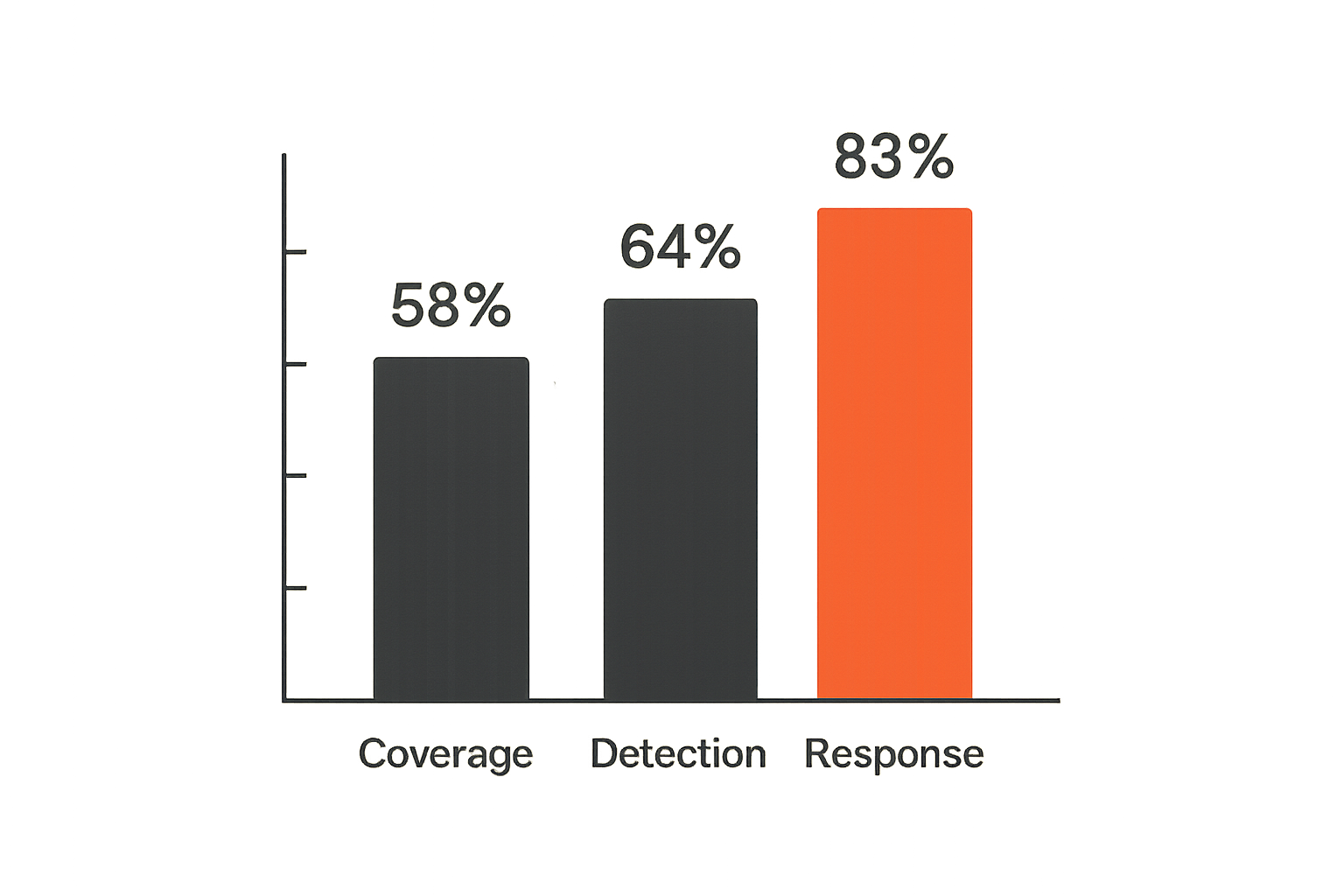
Coverage metrics tell you whether the SOC is watching the right surface.
Useful measures:
- Percent of high-sensitivity public pages inventoried.
- Percent of sensitive pages with named owners.
- Percent of risky prompt families with approved answers.
- Number of third-party sources tracked for critical workflows.
- Percent of deprecated pages redirected or removed.
Avoid vanity metrics such as total AI mentions unless they connect to risk. Visibility without context is not useful.
Detection quality metrics
Detection metrics should separate crawler noise from actionable findings.
Track:
- Alerts by content class and severity.
- True positive rate for suspicious crawler detections.
- Number of answer drift findings by scenario.
- Repeat findings from the same source or workflow.
- Time from content change to answer drift detection.
- False positives caused by legitimate crawler activity.
If every bot hit becomes a ticket, the program will fail. If nothing ever fires, the program is decorative.
Response metrics
Response metrics show whether the organization can actually correct the answer layer.
Track:
- Mean time to assign owner.
- Mean time to content correction.
- Mean time to answer validation.
- Percent of high-severity findings closed with evidence.
- Recurrence rate after remediation.
- Support or abuse tickets linked to answer drift.
The most important metric is not ranking. It is time from risky public knowledge to verified correction.
Practical rule: measure the workflow from detection to validated correction, not just crawler volume or answer visibility.
Where ThreatCrush fits
Connect proactive and reactive work
Answer engine optimization threat hunting sits between proactive exposure management and reactive SOC response. That is exactly where many security programs have friction.
The proactive side wants inventories, baselines, exposure scoring, and owner mapping. The reactive side wants alerts, evidence, enrichment, and response playbooks. If those live in disconnected tools, the SOC sees symptoms but not context.
ThreatCrush is useful when teams need to bring signals, workflows, detection logic, and operational context into one security operations motion. The goal is not to create another dashboard for AI crawlers. The goal is to connect crawler behavior, public content risk, answer drift, and incident response decisions.
Make ownership visible
Most failures in this space are ownership failures. The page is owned by docs, the traffic by web, the suspicious source by trust and safety, the incident by the SOC, and the customer confusion by support.
A security operations platform should make that visible. Findings need severity, evidence, affected assets, source links, owners, status, and validation requirements. Otherwise answer drift becomes a Slack thread that nobody can close.
ThreatCrush-style workflows help teams define who handles crawler anomalies, who validates public content changes, and who decides when an answer issue crosses into incident response.
Keep AI discovery in the SOC workflow
The important architectural choice is to avoid a separate AI visibility silo. If answer engine findings are security relevant, they should land where analysts already triage signals and responders already manage cases.
That does not mean every AI answer belongs in the SOC queue. It means high-risk scenarios should be normalized into the same operating model as other external exposure and threat intelligence signals:
- Enrich with asset and content context.
- Score by business impact.
- Route to accountable owners.
- Track remediation.
- Validate that the risky state changed.
That is how answer engine optimization threat hunting becomes a workflow instead of a novelty project.
Closing make answer engine optimization threat hunting operational
Start narrow
Do not start by trying to monitor every answer about the company. Start with five to ten scenarios where a wrong answer could cause real damage: login, support, billing, API keys, admin access, SSO, security posture, incident contact, or customer data handling.
For each scenario, define the approved answer, official sources, unacceptable drift, owner, and validation method. Then add crawler and content telemetry around the pages that feed those answers.
Treat answers as evidence
AI-generated answers are not authoritative by default, but they are evidence of how public knowledge is being interpreted. For a SOC, that evidence can reveal stale content, poisoned sources, impersonation, crawler abuse, and recon-friendly summaries.
Capture the answer, the prompt, the time, the cited sources, and the affected workflow. Without evidence, teams debate opinions. With evidence, they can triage and remediate.
Move from visibility to control
The practical goal is not to win every AI answer. The goal is to reduce operational risk in the discovery layer that answer engines now create.
Answer engine optimization threat hunting gives security teams a way to map that layer, detect drift, route fixes, and validate correction. In 2026, that belongs in the SOC conversation because attackers and users both rely on synthesized public knowledge. If your team cannot see how that knowledge is formed, you cannot control how it fails.
Try threatcrush.com
ThreatCrush helps security teams connect signals, detection workflows, operational context, and response ownership. Try threatcrush.com.
Try ThreatCrush
Real-time threat intelligence, CTEM, and exposure management — built for security teams that move fast.
Get started →