AI Agents in Security Operations: Build the Workflow Before You Automate the SOC

AI agents security operations projects usually start with a demo that looks useful: summarize an alert, enrich an indicator, draft a response, maybe open a ticket. Then production happens. The agent touches stale context, over-trusts a weak signal, misses the business owner, or takes an action nobody can explain during the incident review.
Teams think the problem is getting a smarter model into the SOC. The real problem is designing a controlled workflow where machine reasoning, security evidence, human authority, and response systems all have clear boundaries.
That changes the conversation. AI agents are not a magic replacement for analysts. They are execution layers that can coordinate repetitive investigation work, normalize context, and propose actions when the operating model is ready for them.
The practical question is not “Can an AI agent investigate an alert?” It is “Which parts of our security operations workflow are safe, measurable, and valuable enough to delegate?”
Table of contents
- AI agents in security operations are a workflow design problem
- The operating model for ai agents security operations teams can trust
- Choose the right SOC use cases before choosing an agent framework
- Build the context layer before the reasoning layer
- Design the agent workflow from signal to response
- Control risk with permissions, policy, and human review
- Measure ai agents security operations performance like a SOC system
- What breaks when teams implement agents badly
- What works in production
- Where ThreatCrush fits in an agent-assisted SOC
AI agents in security operations are a workflow design problem
Why the SOC is a hard environment for agents
Security operations is not a clean helpdesk queue. Alerts are incomplete. Asset ownership is messy. Identity context changes. Detections fire with uneven fidelity. The analyst often has to decide whether missing evidence is meaningful or just unavailable.
That is a difficult environment for any automated reasoning system. AI agents can call tools, chain tasks, summarize findings, and decide next steps. But if the underlying workflow is ambiguous, the agent inherits that ambiguity and accelerates it.
The mistake teams make is assuming agent capability compensates for SOC process gaps. It does not. It exposes them faster.
A useful way to think about it is this: an agent is not an analyst. It is a controlled workflow participant. It needs inputs, allowed tools, decision boundaries, memory rules, escalation criteria, and audit trails.
Practical rule: Do not deploy an AI agent into a workflow you cannot explain with a swimlane diagram.
Where agents can actually help
AI agents are useful when the work is repetitive, evidence-driven, and bounded. That includes:
- Enriching alerts with identity, asset, vulnerability, and threat intelligence context.
- Correlating related events across SIEM, EDR, cloud logs, and case history.
- Drafting investigation notes from tool output.
- Suggesting likely detection logic gaps.
- Preparing response options for analyst approval.
- Routing cases to the right owner based on asset, application, and severity.
The value is not that the agent “understands security” in a human sense. The value is that it can reduce switching costs and keep analysts from doing the same lookup sequence twenty times per shift.
Where agents should not start
The worst first use case is autonomous containment on high-impact systems. Blocking accounts, isolating servers, disabling cloud keys, or pushing firewall changes may be valid later. They are bad starting points.
Start where the agent can be wrong without causing damage. Let it summarize, enrich, classify, and recommend. Then validate whether it reduces investigation time and improves consistency.
What breaks in practice is usually not the model’s grammar. It is the unreviewed action path.
The operating model for ai agents security operations teams can trust
Define the agent role before the tool
Before choosing an orchestration framework or model provider, define the operating role. Is the agent a triage assistant, an enrichment worker, a case summarizer, a detection engineering helper, or a response coordinator?
Each role needs a different control model. A triage assistant may only read alerts and write notes. A response coordinator may read evidence, propose actions, and request approvals. A detection helper may read historical cases and produce candidate rules, but should not deploy them without review.
The team at logicsrc.com works on interoperable AI agent systems, and that perspective is useful here because SOC agents should be designed as controlled participants in a larger platform, not as isolated chat windows.
Separate decision support from execution
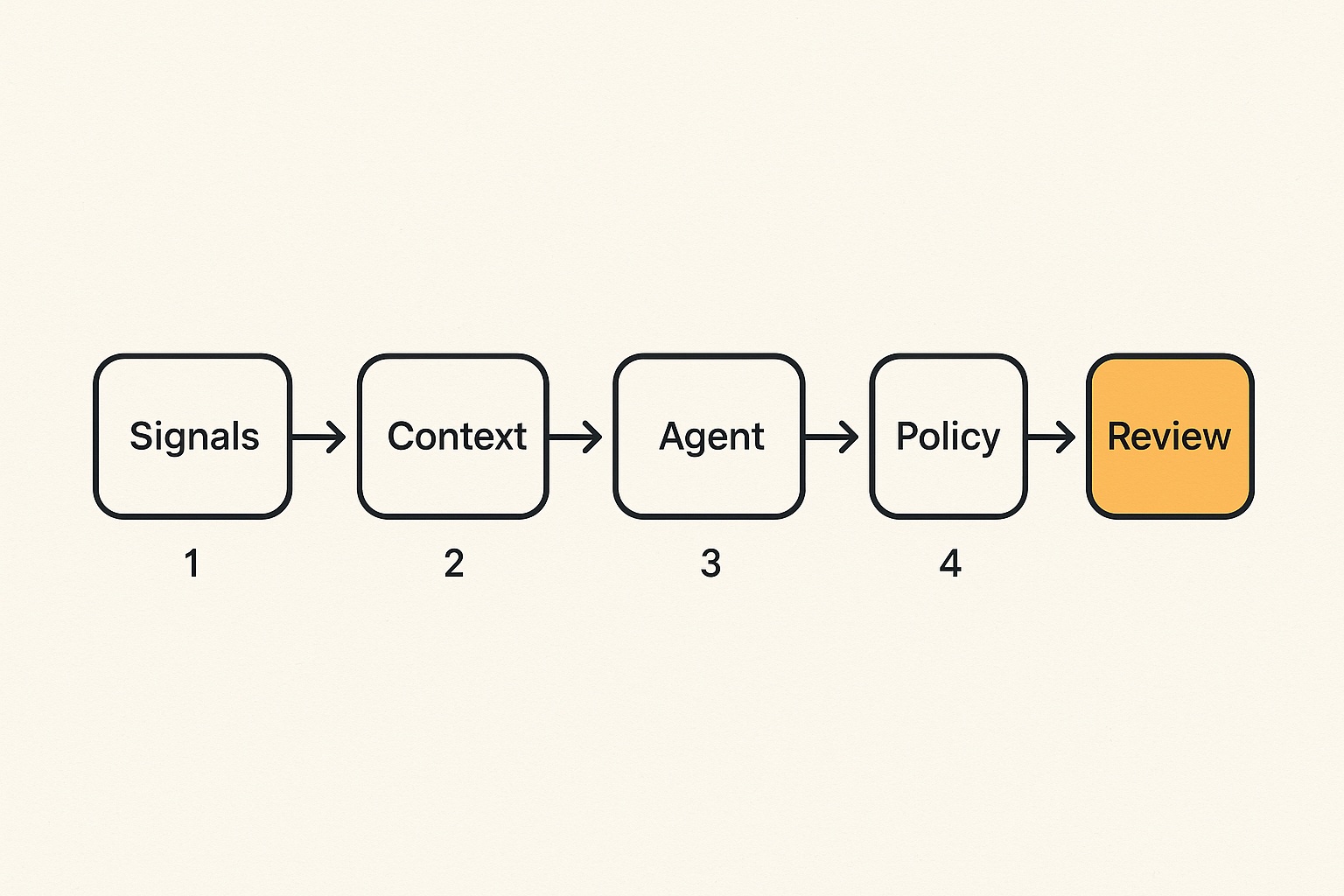
The cleanest architecture separates three layers:
- Reasoning: The model interprets evidence and proposes a conclusion.
- Policy: A deterministic control layer decides what is allowed.
- Execution: Approved tools perform the action and record the result.
Do not let a prompt become the policy layer. Prompts are instructions, not enforceable controls. The agent can be told not to isolate production servers, but the safer design is to make production isolation unavailable unless an approval rule is satisfied.
Practical rule: If an agent can take an action, the permission boundary should be enforced outside the model.
Make every action observable
Every agent step should produce an event: what it read, what tool it called, what evidence it used, what conclusion it generated, and what action it requested. This matters for debugging, compliance, and incident review.
A useful audit record includes:
- Case ID or alert ID.
- Agent version and prompt/config version.
- Retrieved documents or evidence references.
- Tool calls and parameters.
- Confidence or uncertainty statement.
- Human approvals or overrides.
- Final outcome.
If the team cannot replay the agent’s reasoning path, it cannot safely rely on the result.
Choose the right SOC use cases before choosing an agent framework
Good first use cases
Good first use cases have three traits: bounded scope, low blast radius, and clear evaluation criteria.
Examples include:
- Phishing triage enrichment: extract URLs, analyze sender domain, check mailbox history, summarize risk indicators.
- Endpoint alert explanation: collect process tree, user context, file reputation, and recent related detections.
- Cloud alert routing: map resource owner, environment, data sensitivity, and previous activity.
- Threat intel matching: compare observables against internal sightings and known campaigns.
- Case summary generation: turn investigation artifacts into a concise handoff note.
These workflows save analyst time without granting the agent direct destructive power.
Bad first use cases
Bad first use cases combine ambiguous evidence with high-impact actions. Examples include:
- Fully autonomous account disablement for privileged users.
- Automatic network isolation of production systems.
- Unreviewed firewall or IAM policy changes.
- Model-generated detection deployment without testing.
- Autonomous incident severity declaration for executive notification.
These may become possible with maturity, but they require strong validation, approval, rollback, and business context.
A comparison table for prioritization
| Use case | Agent value | Risk level | Good first project? | Why |
|---|---|---|---|---|
| Alert enrichment | High | Low | Yes | Reads context and writes notes |
| Case summarization | Medium | Low | Yes | Improves handoff consistency |
| Detection draft generation | Medium | Medium | Sometimes | Needs engineer review and testing |
| User containment recommendation | High | Medium | Later | Decision support before action |
| Autonomous host isolation | High | High | No | Direct operational blast radius |
| IAM policy modification | Medium | High | No | Hard to validate safely in real time |
The point is not to avoid ambitious automation forever. The point is to earn it.
Practical rule: Start with read-heavy workflows, then move toward write actions only after the evidence, policy, and approval layers are proven.
Build the context layer before the reasoning layer
Normalize evidence, not just alerts
An AI agent is only as useful as the context it can access. Many SOCs have plenty of alerts but weak evidence normalization. The agent sees an alert title, a user, an IP address, and maybe a severity label. That is not enough.
Normalize the evidence the analyst would normally gather:
- Process lineage and command line.
- User identity, role, group membership, and recent authentication behavior.
- Asset criticality, owner, environment, and exposure.
- Vulnerability state and patch posture.
- Cloud resource tags and data sensitivity.
- Prior case history involving the same entities.
- Detection logic, assumptions, and known false-positive patterns.
The agent should not guess asset criticality from a hostname. It should retrieve it from the system of record.
Use retrieval with hard boundaries
Retrieval-augmented generation can help agents ground their output in internal documentation, runbooks, detection notes, and historical cases. But retrieval must be scoped.
Bad retrieval pulls from every document the organization has ever indexed. Good retrieval uses case type, data classification, and role permissions to decide what the agent can see.
For example, a phishing triage agent may need mailbox telemetry, URL detonation results, sender authentication records, and previous phishing cases. It probably does not need unrelated HR documents, legal memos, or sensitive incident reports outside the case scope.
Treat identity and asset context as first-class data
Most SOC investigations eventually ask two questions: “What is this thing?” and “Who owns it?” AI agents need reliable answers.
Identity context should include user role, privilege level, department, normal login regions, MFA state, and recent account changes. Asset context should include environment, owner, criticality, internet exposure, installed controls, and business function.
Without that context, the agent may treat a developer laptop, a domain controller, and a test VM as equivalent endpoints. Analysts do not make that mistake. Your automation should not either.
Design the agent workflow from signal to response
A practical implementation sequence
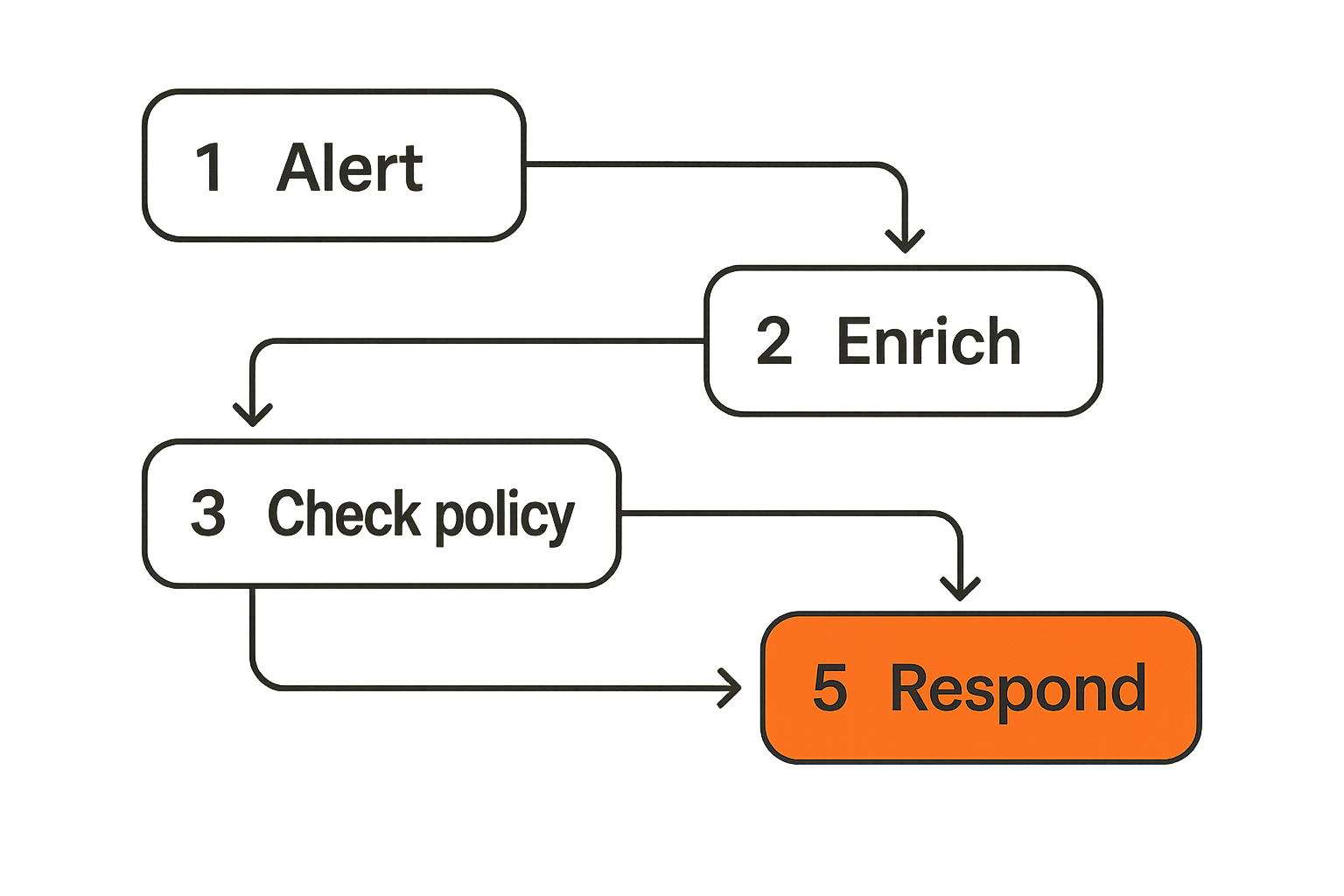
A working AI agent workflow for SOC triage can be built in stages:
- Select one alert family. Pick a detection with meaningful volume and a known investigation path.
- Map the analyst workflow. Document the exact lookups, decisions, and escalation points analysts use today.
- Define allowed inputs. Specify which alert fields, logs, cases, and context stores the agent may read.
- Define allowed outputs. Start with notes, classifications, recommendations, and ticket updates.
- Wrap tool calls. Put APIs behind controlled functions with logging, timeouts, and parameter validation.
- Add policy checks. Enforce what the agent can do based on case severity, asset criticality, and approval state.
- Test against historical cases. Replay known true positives, false positives, and messy edge cases.
- Deploy in shadow mode. Let analysts compare agent output without depending on it.
- Move to assisted mode. Allow the agent to update cases or request approvals when quality is proven.
- Review outcomes weekly. Track misses, bad recommendations, time saved, and analyst overrides.
This sequence is not glamorous. It is how you avoid turning the SOC into an experiment during an incident.
State management matters more than prompts
A SOC agent needs state. It must know what evidence has already been collected, what conclusions were made, which tools failed, what the analyst approved, and whether the case changed.
Without state management, the agent repeats tool calls, contradicts earlier findings, or overwrites analyst notes. Prompts cannot fix that reliably.
Track state in a case object or workflow engine, not only in the model conversation. The case state should outlive the chat session and be available for audit, replay, and handoff.
Escalation paths must be explicit
Agents should know when to stop. Ambiguous evidence, tool failures, privileged accounts, critical assets, and conflicting signals should trigger escalation.
Useful escalation triggers include:
- Confidence below a defined threshold.
- Evidence source unavailable or stale.
- Asset marked critical or regulated.
- User has privileged access.
- Detection maps to active incident criteria.
- Recommended action exceeds agent authority.
- Similar case was previously escalated by analysts.
An agent that always produces an answer is less useful than an agent that knows when the answer is not safe.
Control risk with permissions, policy, and human review
Use least privilege for agent actions
Do not give an agent analyst-equivalent access by default. Most SOC agents need narrower permissions than humans because they operate faster and can repeat mistakes at scale.
Create specific service identities for specific roles. A phishing triage agent should not have EDR isolation permissions. A detection drafting agent should not have production rule deployment rights. A case summarization agent should not read unrelated legal incident archives.
Least privilege also applies to data. If an agent only needs a derived risk score, do not expose the full sensitive dataset.
Put policy between the model and the action
Policy should be deterministic, testable, and owned. It can live in a workflow engine, SOAR platform, custom middleware, or policy-as-code layer.
Example policy logic:
agent_action_policy:
  action: isolate_endpoint
  allowed_when:
    - case.severity in ["high", "critical"]
    - asset.environment != "production"
    - asset.criticality != "tier_0"
    - approval.status == "approved"
    - approver.role in ["incident_commander", "soc_lead"]
  deny_when:
    - identity.user_type == "service_account"
    - evidence.sources_missing > 1
    - case.confidence < 0.85
  log_required: true
The model can recommend isolation. The policy decides whether isolation is available. The execution layer performs it.
Require approvals where blast radius exists
Human review is not a failure of automation. It is part of the control system.
For high-blast-radius actions, the agent should prepare the decision packet: evidence summary, affected assets, recommended action, expected impact, rollback plan, and uncertainty. The human should approve, reject, or modify the action.
This is where agents can be very useful. They reduce the time required to make a decision without pretending that accountability disappeared.
Practical rule: Automate preparation before you automate authority.
Measure ai agents security operations performance like a SOC system
Useful metrics for agent-assisted SOC work
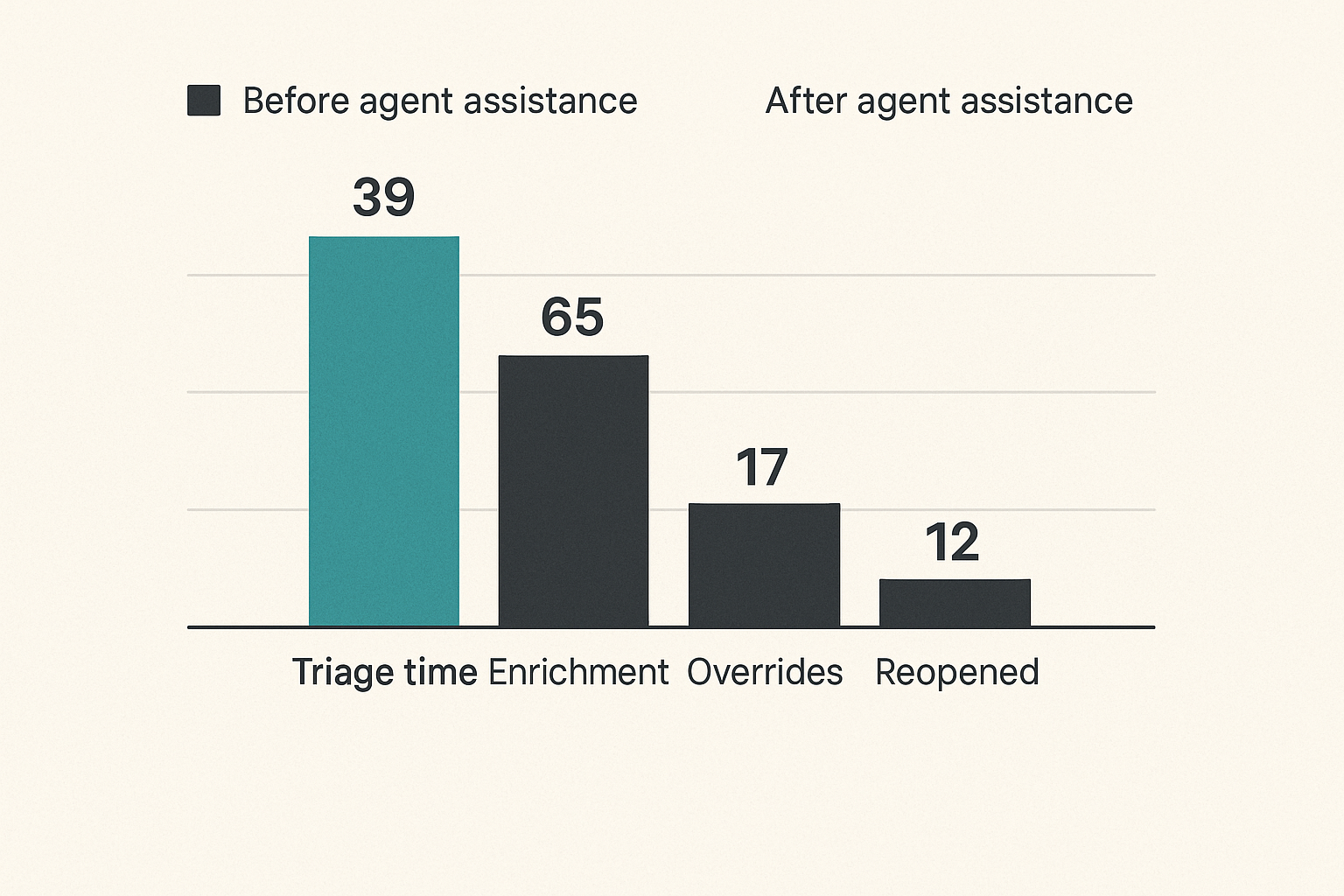
Do not measure an agent only by whether analysts “like it.” Measure operational outcomes.
Useful metrics include:
- Mean time to triage for supported alert types.
- Percentage of cases with complete enrichment.
- Analyst override rate.
- Incorrect recommendation rate.
- Escalation precision.
- Tool call failure rate.
- Time saved per case type.
- False-positive closure consistency.
- Cases reopened after agent-assisted closure.
Some metrics will initially get worse because the agent exposes missing data or inconsistent process. That is not necessarily failure. It may be the first accurate view of the workflow.
Validation sets and replay testing
Build validation sets from historical cases. Include easy true positives, common false positives, edge cases, incomplete logs, tool failures, and analyst-disputed outcomes.
Replay testing answers questions a live pilot cannot answer safely:
- Would the agent have escalated the ransomware precursor case?
- Would it have closed a known false positive correctly?
- Would it have overreacted to a benign admin script?
- Would missing identity context change the recommendation?
- Would the same case produce the same output after a prompt or model update?
Version the validation set. Version the agent configuration. Treat changes like detection engineering changes, not copy edits.
Measure analyst trust separately
Analyst trust is not the same as model accuracy. An agent can be accurate but unusable if it hides reasoning, produces verbose summaries, or interrupts the case flow.
Ask analysts specific questions:
- Did the agent surface evidence you would have checked manually?
- Did it miss any required step in the runbook?
- Was the recommendation actionable?
- Was uncertainty clearly stated?
- Did the output reduce or increase your workload?
Trust improves when agents are predictable, inspectable, and easy to correct.
What breaks when teams implement agents badly
Prompt-only automation creates hidden process debt
Prompt-only implementations look fast. They are also fragile. A long instruction block tells the model how to behave, but it does not create durable state, enforce permissions, validate tool parameters, or record decisions.
The common failure pattern is familiar:
- The first demo works.
- More exceptions are added to the prompt.
- The agent starts handling multiple use cases.
- Nobody knows which instruction caused which behavior.
- A model update changes outputs.
- Analysts stop trusting it.
Prompts matter, but they are not architecture.
Unowned agents become another noisy system
Every SOC system needs an owner. Agents are no exception. Someone must own the workflow, data quality, evaluation set, permissions, integrations, and incident review process.
If ownership is vague, the agent becomes another alert source: sometimes helpful, sometimes wrong, always requiring interpretation.
Assign ownership across functions:
- SOC operations owns use-case fit and analyst workflow.
- Detection engineering owns detection assumptions and validation cases.
- Security architecture owns permissions and integration patterns.
- Incident response owns escalation and authority boundaries.
- Platform engineering owns reliability, logging, and deployment.
No single team can safely own the entire thing in isolation.
Bad integrations turn into incident risk
What breaks in practice is often integration quality. APIs time out. EDR returns partial data. CMDB records are stale. Ticket fields are inconsistent. The agent writes a note to the wrong case or uses a hostname that resolves to multiple assets.
Build for bad integration behavior:
- Timeouts and retries.
- Idempotent writes.
- Parameter validation.
- Source freshness checks.
- Conflict detection.
- Read-only fallback mode.
- Clear error messages for analysts.
A brittle integration can make a good model dangerous.
What works in production
Start narrow and deepen the workflow
The best deployments usually start with one alert family and one team. They do not try to build a general SOC brain. They build a reliable assistant for a painful workflow.
For example, start with suspicious OAuth consent alerts. The agent enriches the app, user, tenant history, permissions requested, prior consent events, and known risky publisher signals. It then drafts a triage note and recommends closure, escalation, or user outreach.
Once that works, deepen the workflow: add approval requests, user notification drafts, detection tuning recommendations, and post-case learning.
Keep analysts in the control loop
The analyst should be able to see what the agent did, correct it, and teach the workflow. Feedback should not disappear into a chat transcript. It should update validation cases, runbook logic, retrieval sources, or policy rules.
Good analyst controls include:
- Accept, reject, and edit options for agent notes.
- Structured reasons for overrides.
- One-click escalation when evidence is insufficient.
- Visibility into retrieved sources.
- Clear indication of tool failures.
- Ability to suppress low-value agent behavior by case type.
This keeps the agent from becoming a black box sitting beside the actual SOC process.
Document the agent like production infrastructure
Document the agent as if it were a detection rule, SOAR playbook, and production service combined.
Minimum documentation should include:
- Purpose and supported use cases.
- Data sources and permissions.
- Tool actions and limits.
- Policy rules and approval requirements.
- Known failure modes.
- Evaluation methodology.
- Owner and change process.
- Rollback and disable procedure.
If an incident commander asks, “Why did the agent recommend this?” the team should have an answer that does not depend on guessing what happened in a model session.
Where ThreatCrush fits in an agent-assisted SOC
Use agents to connect proactive and reactive work
AI agents security operations programs work best when they connect proactive and reactive work instead of creating another disconnected tool. Detection engineering, threat intelligence, exposure management, and incident response all produce context the agent can use.
ThreatCrush is built for security operations teams that care about signals, workflows, detection, and response context. In an agent-assisted SOC, that matters because the agent should not float above the program. It should operate inside the same evidence fabric analysts already trust.
A practical product fit is not “let the AI handle the SOC.” It is more specific:
- Use curated security context to improve triage quality.
- Use workflow structure to reduce repetitive investigation steps.
- Use detection and response history to ground recommendations.
- Use operational visibility to see whether automation is helping or adding noise.
That changes the conversation from agent hype to SOC architecture.
The closing architecture
The durable pattern for ai agents security operations is straightforward:
- Pick a narrow, painful workflow.
- Normalize the evidence analysts already need.
- Give the agent limited tools and explicit permissions.
- Put policy between reasoning and execution.
- Keep humans in approval paths for high-impact actions.
- Validate against historical cases.
- Measure operational outcomes, not demo quality.
- Expand only when the workflow earns trust.
The teams that get value from agents will not be the teams with the longest prompts. They will be the teams with the clearest operating model.
AI agents can reduce noise, shorten investigations, and improve consistency. But only when they are treated as part of the SOC system: observable, bounded, validated, and owned.
Try threatcrush.com
ThreatCrush helps security operations teams connect signals, workflows, detection context, and response decisions. Try threatcrush.com.
Try ThreatCrush
Real-time threat intelligence, CTEM, and exposure management — built for security teams that move fast.
Get started →